
Most SEO practitioners treat internal linking as an afterthought — something you do after publishing, if you remember. That’s a missed opportunity. Internal links are among the few ranking levers you fully control, and in 2026, their role has expanded beyond traditional organic search into AI-generated answers, LLM citability, and generative search surfaces.
This guide covers the complete internal linking workflow: the mechanics of how link equity actually flows, how to build topic clusters that compound authority, the specific numbers and ratios that matter, a repeatable audit process, and how to scale it all when your site grows past the point where manual linking is viable.
What Internal Links Actually Do (and Why the Basics Still Win)
Internal links are hyperlinks connecting one page on your domain to another. That definition hasn’t changed, but what they accomplish has gotten more layered.
At the crawl level, internal links are how Googlebot discovers pages. Google has been direct about this: every page you care about should be linked from at least one other page on your site. Pages with no internal links — orphan pages — may never get crawled or indexed, regardless of content quality. A JetOctopus large-site case study found that revising internal linking architecture moved Googlebot crawl coverage from approximately 40% of pages to 70%, a roughly 30 percentage-point improvement from linking changes alone.
At the authority level, internal links distribute link equity (the ranking power derived from backlinks and other signals) across your site. Your homepage typically accumulates the most equity because it attracts the most external links. Every internal link from that homepage to a subpage transfers a portion of that authority. The same principle applies from any high-authority page to any lower-authority one.
At the semantic level, internal links tell search engines how your content relates. A cluster of pages about email marketing, all interlinked, signals depth and expertise in that topic. This is the foundation of topical authority — and in 2026, it’s also the foundation for being cited in AI-generated search results.
The practical upside for users is just as concrete: internal links keep visitors moving through your site, reduce bounce rates, and guide them toward conversion pages. These are engagement signals that search algorithms weigh, creating a feedback loop where good linking improves rankings, which drives more traffic, which generates more engagement data.
Internal Links in the Age of AI Search
This is the section most existing guides skip, and it’s the most strategically important addition for 2026.
Google AI Overviews now appear on roughly 30-47% of U.S. search queries (depending on the data source), and organic click-through rates drop by an average of 34.5% when an AI Overview appears. However, being cited inside an AI Overview increases a page’s organic CTR by about 35% compared to not being cited. The implication is clear: the new visibility game is citation, not just ranking.
Internal linking plays a direct role here in three ways.
Crawl accessibility for AI indexing. AI search systems — whether Google’s AI Overviews, ChatGPT’s web search, or Perplexity — rely on crawlable, well-structured sites to source information. If your pages are orphaned or buried at 5+ click depth, AI systems are less likely to encounter and cite them. The same linking architecture that helps Googlebot helps AI crawlers.
Topical authority signals. AI Overviews consistently cite content that demonstrates comprehensive topic coverage. Research from Surfer SEO shows that the typical AI Overview-cited article covers 62% more facts than a non-cited one. Topic clusters connected by internal links are the structural mechanism that proves comprehensive coverage. A single standalone article on “email marketing” is less likely to be cited than a pillar page surrounded by 15 interlinked cluster articles covering segmentation, deliverability, automation, analytics, and A/B testing.
Semantic clarity for extraction. LLMs parse content more effectively when the information architecture is predictable. Clear heading hierarchies, contextual internal links with descriptive anchor text, and logical page relationships all make your content easier for AI systems to interpret, extract, and attribute accurately. Schema markup helps clarify meaning, but Google has been explicit that structured data does not substitute for HTML links when it comes to passing equity and enabling discovery.
If you’re building an internal linking strategy in 2026, you’re building it for two audiences simultaneously: traditional search crawlers and AI/LLM systems. The good news is that the requirements overlap almost entirely — well-structured, deeply interlinked, semantically clear content wins on both fronts.
Types of Internal Links and Where Each One Fits
Not all internal links carry equal weight. Understanding the hierarchy helps you allocate effort where it matters most.
Contextual links — embedded within body content, inside paragraphs — are the highest-value internal link type. Search engines treat them as editorial endorsements: someone deliberately chose to reference that page in the context of a related discussion. Multiple contextual links pointing to one page amplify the signal that the page is important and relevant.
Navigational links — main menus, header navigation, mega menus — define your site’s primary structure. They appear on every page, which means they pass equity broadly but thinly. A global nav with 40+ links dilutes the equity each link carries. Keep main navigation focused on your most important category pages.
Sidebar and related-post links sit between navigational and contextual in terms of SEO impact. They’re useful for keeping users engaged and surfacing content that doesn’t fit in the main nav, but search engines give them less weight than in-body contextual links.
Breadcrumb links serve a dual purpose: they show users their location in the site hierarchy and give search engines an explicit crawl path. Google renders breadcrumb structured data in search results, but the HTML breadcrumb links themselves are what carry equity. Implement both the visible breadcrumb trail and the corresponding Schema markup.
Footer links are the lowest-priority internal link type. Google has historically treated excessive footer links as potential spam signals — a penalty wave in 2013 targeted sites with 50+ keyword-rich footer links. Use footers for utility pages (privacy policy, contact, terms of service) and a handful of key pages, not as a link farm.
How Link Equity Actually Flows: The Mechanics That Matter
Most guides explain link equity as “authority passes from page to page through links.” That’s true but incomplete. Several mechanics affect how much equity actually reaches the destination.
The dampening factor. Google’s original PageRank formula includes a dampening factor of 0.85, meaning roughly 15% of equity dissipates at each hop. A page three clicks deep from a high-authority source receives meaningfully less equity than one directly linked. This is why flat site architecture — keeping important pages within 2-3 clicks of the homepage — has a real mathematical basis, not just a UX one.
Link count dilution. A page’s total equity is divided among all outgoing links on that page. A page with 20 outgoing links passes roughly 5x more equity per link than a page with 100 outgoing links. This matters for navigation menus: a mega menu with 80+ links on every page creates systemic equity dilution across your entire site. Streamlining navigation concentrates equity on the pages that need it most.
Position on page. Links placed higher in the content — within the first few paragraphs — carry more weight than links buried at the bottom. Google’s own documentation and several SEO experiments confirm this. When you’re strategically linking to a priority page, place that link early in the article, not as an afterthought at the end.
First-link priority. When a page links to the same destination URL multiple times, Google typically only counts the first link (in HTML order) for PageRank purposes. If you link to your pricing page from both the nav and the body content, the nav link (which appears first in HTML) is the one that carries anchor text signals. Plan your anchor text accordingly.
Why nofollow doesn’t help internally. Some SEOs still try to “sculpt” PageRank by adding rel=”nofollow” to internal links they consider low-priority (login pages, etc.). This doesn’t work as intended. The equity that would have gone to the nofollowed link doesn’t get redistributed to other links — it effectively evaporates. Matt Cutts confirmed this years ago, and the guidance hasn’t changed. If a page doesn’t deserve a link, don’t link to it. But don’t nofollow internal links as a distribution strategy.
Building Topic Clusters That Compound Authority
The topic cluster model — a pillar page surrounded by interlinked cluster content — has become the standard internal linking architecture for content-driven sites. It works because it aligns with how both search engines and AI systems evaluate topical depth.
Choosing your pillar topic. A pillar should be broad enough to support 10-20 subtopic pages, but specific enough to have clear keyword targeting. “Digital marketing” is too broad. “Email marketing for ecommerce” is a viable pillar. Before creating new content, audit what you already have — you may already have 15 articles on a topic that just need to be connected.
Structuring the pillar page. The pillar page should be a comprehensive overview (typically 3,000-5,000 words) that covers all major aspects of the topic at survey depth. It links out to every cluster page for detailed treatment of each subtopic. Think of it as a table of contents with substance — each section gives enough context to be useful on its own, then links to the deep-dive article.
Cluster content requirements. Each cluster page targets a specific long-tail keyword and covers its subtopic thoroughly. A pillar page about “PPC campaign management” might have cluster pages on “negative keyword strategy,” “Quality Score optimization,” “ad copy testing frameworks,” “budget pacing techniques,” and “campaign structure for ecommerce.”
The linking rules that make clusters work:
- Every cluster page links to the pillar page (using the pillar’s primary keyword or a close variant as anchor text)
- The pillar page links to every cluster page
- Cluster pages link to 2-3 related cluster pages within the same topic (not just back to the pillar)
- Use descriptive, varied anchor text for cross-cluster links
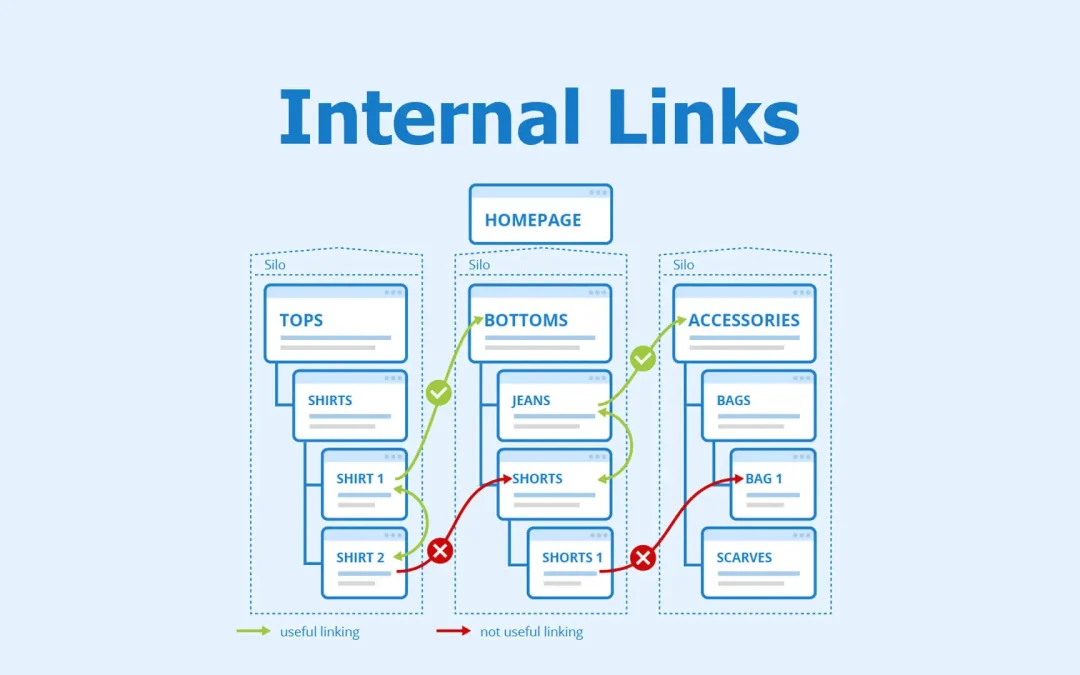
This bidirectional linking creates a closed authority loop. When any single cluster page earns an external backlink, the equity flows through internal links to the pillar and to sibling cluster pages. One strong backlink to a subtopic article lifts the rankings of the entire cluster.
A real-world pattern: A Semrush case study from 2025 showed that a SaaS startup with well-organized, contextually relevant internal linking outperformed a competitor with similar domain authority by more than 4x in monthly organic traffic. The difference was structural: the winning site used disciplined topic clusters while the competitor linked between unrelated pages.
Anchor Text Strategy: Specific Ratios, Not Vague Advice
Anchor text tells search engines what the destination page is about. Vague anchors like “click here” or “read more” waste that signal entirely. But over-optimizing with exact-match keyword anchors triggers algorithmic penalties.
The competitive consensus in 2026 points to these approximate distributions for internal anchor text:
- Exact-match keyword anchors: 20-30% of your internal links. Use them, but don’t overdo it. “Internal linking strategy” pointing to your internal linking guide is appropriate — just not on every single link to that page.
- Partial-match / long-tail variants: 30-40%. “How to improve your internal linking,” “strategies for internal link optimization,” “building better internal links.” These provide topical relevance with natural variation.
- Branded, URL, or generic anchors: 10-15%. “Our guide,” “this resource,” your brand name. These feel natural and break up keyword-heavy patterns.
- LSI / entity-related terms: 20-30%. “Crawl depth optimization,” “link equity distribution,” “site architecture for SEO.” These terms are semantically related but not direct keyword matches, which adds topical breadth.
If you audit your existing anchors and find that exact-match anchors exceed 25% for any single destination page, diversify immediately. Use Ahrefs’ Internal Backlinks report or Screaming Frog’s anchor text analysis to check your current distribution.
The surrounding text matters too. Search engines read the sentences around your link for additional context. A link to “keyword research tools” embedded in a paragraph about content strategy sends a weaker signal than the same link in a paragraph specifically discussing keyword research workflows.
Link Density: How Many Internal Links Per Page
There’s no official Google limit on internal links per page, but practical guidelines have emerged from testing and large-site experience.
For body content: aim for 2-5 contextual internal links per 1,000 words. For a 2,000-word article, that’s roughly 4-10 contextual links — enough to create useful connections without overwhelming the reader or diluting equity excessively.
For total links per page (including navigation, sidebar, footer, and body): keep the count under 150. Beyond that, Google may not follow all links, and equity gets diluted to the point where individual links carry negligible weight. Most well-structured sites stay well below this threshold.
Spacing matters. Distribute links evenly through the content rather than clustering them in one section. A paragraph with four links and four paragraphs with no links creates an uneven reading experience and concentrates signals in one spot.
Don’t force links. Every internal link should answer a plausible reader question or provide genuinely useful context. A link exists to serve the reader’s next logical step — not to hit a link count target.
A Repeatable Internal Link Audit Process
An internal linking strategy decays over time. New content publishes without links, old URLs break, redirects chain up, and priority pages drift deeper in the site hierarchy. A quarterly audit (with monthly spot checks for broken links) keeps the system healthy.
Step 1: Crawl the full site.
Use Screaming Frog (or Sitebulb, or Ahrefs Site Audit) in Spider mode with link crawling enabled. This produces a complete dataset of every URL, its inlinks (internal links pointing to it), outlinks (internal links it sends), response codes, and crawl depth.
Step 2: Find orphan pages.
Export your crawl data and compare it against your XML sitemap. URLs in the sitemap but missing from the crawl are likely orphaned — they exist but no internal link leads to them. In Screaming Frog, you can cross-reference the sitemap crawl with the spider crawl to surface these. In Ahrefs, the Site Audit dashboard has a dedicated Orphan Page report. Every orphan page is either a page that needs internal links added, or a page that should be removed or redirected.
Step 3: Identify underlinked high-value pages.
Sort your crawl export by inlink count, then cross-reference with your priority pages (product pages, service pages, conversion pages, pillar content). Any priority page with fewer than 5-10 contextual internal links is underlinked. In Semrush’s Site Audit, the Internal LinkRank (ILR) metric scores each page’s importance within your link structure on a 0-100 scale — pages with high commercial value but low ILR need attention.
Step 4: Fix broken links and redirect chains.
In Screaming Frog, filter the Response Codes tab for “Internal Client Error (4xx)” to find all broken internal links. For each one, either fix the destination URL, set up a 301 redirect to the correct page, or remove the link. Then check for redirect chains — internal links that point to URLs that redirect to other URLs that redirect again. Each hop in a redirect chain loses equity and slows crawl efficiency. Update the link to point directly to the final destination URL.
Step 5: Check crawl depth.
Use Screaming Frog’s Site Structure tab to see how many clicks each page is from the homepage. Any priority page at 4+ clicks depth needs to be linked from a higher-level page. The target: all important pages reachable within 3 clicks.
Step 6: Audit anchor text distribution.
Export all anchor text data from your crawl tool and analyze the distribution for your top 20 priority pages. Flag any page where exact-match anchors exceed 25% of total internal links. Diversify by rewriting some anchors to partial-match or semantically related terms.
Step 7: Find unlinked keyword mentions.
Use Screaming Frog’s Custom Search feature (Configuration > Custom > Custom Search) to search your site’s body text for mentions of target keywords that aren’t inside anchor tags. Set the filter to “Page Text (No Anchors)” and search for your pillar page’s primary keyword. Every page that mentions the term without linking to the pillar is a free linking opportunity.
Scaling Internal Linking: Automation Tools and Programmatic Approaches
Manual internal linking works for sites with fewer than 100-200 pages. Beyond that, you need systems.
WordPress plugins for semi-automated linking:
- Link Whisper uses AI-powered content analysis to suggest relevant internal links as you write and for existing content in bulk. It’s the most widely used automation tool for WordPress sites and handles both new-post suggestions and site-wide link opportunity scanning.
- Rank Math (free version) provides contextual link suggestions in the editor sidebar, though it’s less comprehensive than Link Whisper for site-wide analysis.
- Internal Link Juicer automates link creation based on keyword-to-URL mappings you define, useful for sites with predictable keyword-to-page relationships.
Dedicated internal linking platforms:
- Linkbot connects audit findings directly to implementation, with features like dynamic funnel links and indexation workflows. Useful for sites that need to bridge the gap between “analysis spreadsheet” and “actual link changes.”
For programmatic SEO at scale:
If you’re generating hundreds or thousands of pages from templates and data (location pages, product comparison pages, integration pages), internal linking must be built into the template, not added after publication. Every programmatic page should automatically link to its parent hub page and 3-5 related sibling pages. Anchor text should pull from the target page’s primary keyword field in the database. Without this template-level linking, programmatic pages quickly become orphaned at scale — invisible to both search engines and AI systems.
Enterprise crawl-and-link tools:
Semrush Site Audit, Ahrefs Site Audit, and Screaming Frog all provide internal linking reports that work at enterprise scale. For continuous monitoring (versus periodic audits), Semrush’s scheduled crawls and Ahrefs’ automated site audit alerts catch new issues as they appear.
JavaScript, Rendering, and Technical Considerations
A few technical factors can silently undermine your internal linking strategy.
JavaScript-rendered links. If your internal links are generated via client-side JavaScript (common in React, Vue, and Angular SPAs), Googlebot may not follow them reliably. Google renders JavaScript, but with a delay and not always perfectly. If your key internal links only exist in the rendered DOM and not in the initial HTML, they may not pass equity. Use standard HTML anchor tags for critical internal links whenever possible.
Schema markup is not a link substitute. Breadcrumb Schema (BreadcrumbList) helps Google display breadcrumbs in search results, but Google has stated it does not treat URLs in structured data the same as HTML links for PageRank purposes. You need both: HTML breadcrumb links for equity flow and Schema markup for SERP presentation.
Crawl budget for large sites. Google’s crawl budget guidelines specifically target sites with 1M+ pages changing weekly or 10K+ pages changing daily. If your site is in that range, internal linking directly affects what percentage of your pages get crawled in each session. Faster server response times also help — Google’s crawl rate adapts to how quickly your server responds, so page speed is indirectly a linking concern.
Common Internal Linking Mistakes (and How to Fix Them)
Orphan pages. Pages with zero internal links are invisible to crawlers and receive no link equity. Fix: run an orphan page audit quarterly and add contextual links from topically related content.
Linking to irrelevant pages. A link from a page about email marketing to a page about car insurance confuses semantic signals. Fix: only link between topically related content. The Semrush case study mentioned earlier showed that contextually relevant linking outperformed random linking by a factor of 4x in organic traffic outcomes.
Over-optimized anchor text. Using the same exact-match keyword anchor on every link to a page looks manipulative. Fix: diversify to the ratios outlined in the anchor text section above.
Burying links at the bottom. Links placed in the last paragraph get less weight than links in the first few paragraphs. Fix: place your most important contextual links early in the content.
Ignoring new content. Publishing a new article without immediately linking to it from existing related content is the most common source of orphan pages. Fix: make “add internal links from 3-5 existing articles” a required step in your publishing workflow.
Excessive links on every page. Mega menus with 80+ links, sidebars packed with “related posts,” and footers stuffed with keyword links all dilute equity. A SearchPilot A/B test found that reducing the number of links in a link block on a page improved the rankings of the remaining linked-to pages. Fix: streamline navigation and be deliberate about sidebar/footer link counts.
Redirect chains in internal links. Internal links that point to URL A, which 301-redirects to URL B, which 301-redirects to URL C, lose equity at each hop and waste crawl budget. Fix: update the link to point directly to the final destination URL.
Putting It All Together: Implementation Priority
If you’re starting from scratch or revamping an existing site, here’s the order that typically delivers the fastest results:
- Run a full crawl and fix broken links first. This removes obstacles before you start building.
- Identify and link orphan pages. Getting existing content into the crawl path is the lowest-effort, highest-impact move.
- Map your topic clusters. Group existing content into themes and identify pillar pages. Create pillar content where gaps exist.
- Build bidirectional cluster links. Connect every cluster page to its pillar and to 2-3 sibling pages.
- Redistribute equity from high-authority pages. Find your pages with the most external backlinks and add contextual links from them to your priority conversion/product pages.
- Establish a publishing workflow. Every new article must include internal links to related existing content, and existing content must be updated to link to the new article.
- Set up quarterly audits. Crawl, check for orphans, fix broken links, review crawl depth, audit anchor text distribution.
Internal linking compounds. Each new article, each new link, each audit cycle tightens the web. Sites that treat it as ongoing architecture — not a one-time project — consistently outperform those that don’t.







