

A good SEO keyword research tool can reshape the scene of your online presence. These tools have helped me grow blogs to over 100K monthly visitors and generate more than eight figures in revenue for clients. The results aren’t just impressive—they’re transformative for businesses.
Your website’s success depends heavily on keyword research. It’s the classic case where 20% of your work drives 80% of the results. My experience with multiple clients and evaluation of nearly 90 different keyword research tools has taught me something crucial. The right keyword research tool isn’t just helpful—it’s vital to success. The gap between average and excellent keyword research tools often determines whether your content ranks or vanishes into the digital void.
This detailed comparison covers the 15 best SEO keyword research tools for 2026. You’ll find everything from free SEO keyword research tools to premium options. The information here will help you choose the perfect tool that matches your strategy and budget, regardless of your experience level.
Google Keyword Planner

Google Keyword Planner serves as Google’s core keyword research tool. While designed for advertisers, SEO professionals have widely adopted it. This free tool helps users find keywords, analyze search volumes, and refine marketing strategies even without running ad campaigns.
Google Keyword Planner key features
Google Keyword Planner comes packed with several powerful features for keyword research:
- Keyword discovery – Find new keyword ideas related to your business or website content
- Search volume data – See average monthly searches in the last 12 months
- Location targeting – Filter results by countries, states, or zip codes
- Historical data – Check search trends up to 4 years back
- Mobile vs. desktop split – Get separate volume data for different devices
- Keyword forecasting – Calculate potential traffic based on bid amounts
Google Keyword Planner pros and cons
Pros:
- Delivers hyper-local search volume data perfect for location-based businesses
- Free to use with some limitations for non-advertisers
- Provides data straight from Google’s servers
- Targets locations down to specific zip codes
Cons:
- Shows broad search volume ranges (1K-10K) unless you run active ads
- Lacks organic SEO keyword difficulty metrics since competition metrics focus on PPC
- Averages 12 months of search data without detailed trends
- No SERP features analysis or competitor insights
Google Keyword Planner pricing
The tool remains completely free. You need a Google Ads account and billing information to use it, but spending money isn’t required. Running active Google Ads campaigns lets you see exact search volumes instead of ranges.
Google Keyword Planner best use case
Google Keyword Planner excels especially when you have:
- Early-stage keyword brainstorming needs before deeper analysis
- Local businesses that need location-specific search data
- Other SEO tools to cross-reference data
- PPC campaign planning and budget forecasting needs
- Active Google Ads campaigns for full data access
The tool’s direct access to Google’s data makes it a valuable part of any keyword research toolkit, in spite of its limitations.
Google Autocomplete

Google Autocomplete packs surprising keyword research power right in the search box. This smart feature suggests searches as you type, based on what millions of people are searching for.
Google Autocomplete key features
Google Autocomplete makes searching easier through these key capabilities:
- Up-to-the-minute data analysis that reflects popular search patterns and trending topics
- Location-based suggestions that match your area
- Individual-specific experiences from your search history (when logged in)
- Multi-device functionality on desktop, mobile, and other Google properties
- Continuous refinement with each keystroke
Google’s data shows users save 25% of their typing time with this feature. The daily cumulative saving adds up to over 200 years of typing time.
Google Autocomplete pros and cons
Pros:
- Quick access to popular search queries without extra tools
- Shows how people actually search and ask questions
- Helps with local SEO through area-specific keyword insights
- Lets you see competitor comparisons through “brand name vs” searches
- No cost to use
Cons:
- Dedicated keyword tools give more options
- No metrics for search volume or competition
- Your search history can affect results
- You need to type each query manually
- Shows only popular predictions (usually 5-10 suggestions)
Google Autocomplete pricing
The standard Google search interface includes Google Autocomplete at no cost. Developers building with Google Places Autocomplete API pay as they go after using the $200 monthly credit.
Google Autocomplete best use case
Google Autocomplete works great as an extra keyword research tool to:
- Find long-tail keyword variations
- Spot question-based search queries (who/what/when/where/why)
- Learn about competitors through comparison searches
- Track brand reputation through related terms
- Spot content gaps by finding related topics you haven’t covered
The tool becomes a content idea goldmine for blogs, FAQs, and comparison articles when you add “wh-” questions or words like “best” and “vs.”
Ahrefs

Ahrefs stands as a game-changer among SEO keyword research tools and has one of the largest backlink databases worldwide. My experience shows Ahrefs is essential for keyword research and competitor analysis.
Ahrefs key features
The life-blood of Ahrefs is its impressive Keywords Explorer tool. It generates thousands of keyword ideas from a database of 28.7 billion keywords filtered from 110 billion found in total. On top of that, it provides:
- Site Explorer – Analyzes competitor backlinks, organic search traffic, and reveals gaps you can use
- Keyword Difficulty (KD) – Estimates ranking difficulty based on the number of backlinks to top-ranking pages
- Traffic Potential – Shows how much traffic the #1 ranking page gets for your keyword
- Rank Tracker – Monitors your rankings across 190+ countries on both desktop and mobile
- Content Explorer – Finds high-performing content in your niche
Ahrefs pros and cons
Pros:
- The most important backlink data for detailed link analysis
- Easy-to-use interface that makes complex data available
- Accurate keyword difficulty scores help you set priorities
- Parent Topic feature helps you target broader topics while ranking for specific keywords
- Instant keyword clustering saves research time
Cons:
- No free plan or trial (only limited free tools)
- Nowhere near affordable for beginners and small businesses
- Credit-based system on lower plans limits usage
- Shows data only for Google (not other search engines like YouTube or Bing)
- Content Explorer might not be crucial for non-content-heavy strategies
Ahrefs pricing
Ahrefs has four primary subscription plans:
- Lite – USD 129.00/month with 5 projects and 750 tracked keywords
- Standard – USD 249.00/month with 20 projects and 2,000 keywords
- Advanced – USD 449.00/month with 50 projects and 5,000 keywords
- Enterprise – USD 1499.00/month (requires annual commitment)
Each plan comes with one user seat. Extra users cost more.
Ahrefs best use case
My experience shows Ahrefs shines when you need deep competitor analysis and backlink research. The tool works best for:
- Content marketers who run large-scale campaigns and need detailed data
- Businesses that want to understand their competitors’ strategies
- SEO professionals who see backlinks as the foundation of their strategy
- Agencies that handle multiple client projects and need detailed reports
The tool ended up being more than worth its price tag for serious SEO professionals who need informed insights, despite not being budget-friendly.
Semrush
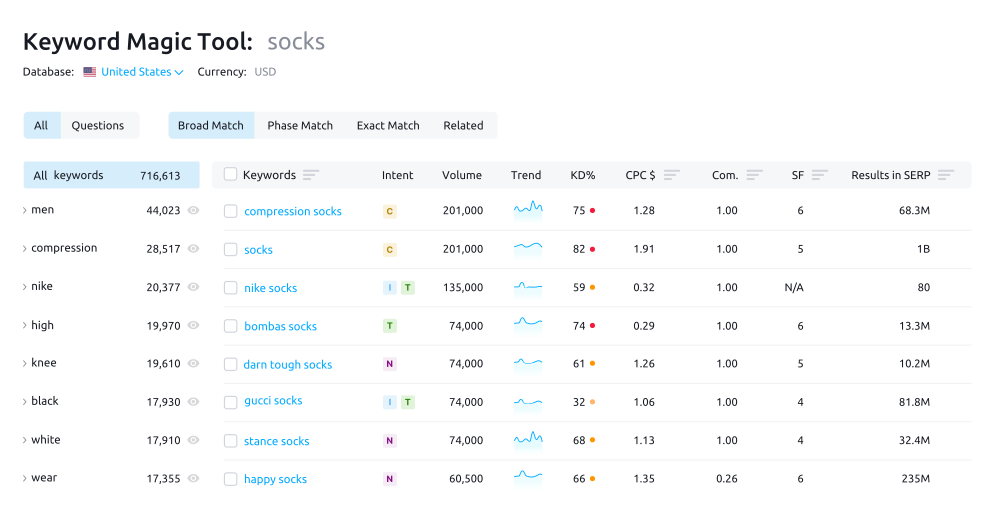
Semrush stands out as the gold standard for digital marketing professionals. It offers a detailed suite of over 50 tools that cover SEO, content marketing, keyword research, PPC, and social media marketing. While other platforms limit themselves to SEO, Semrush delivers complete solutions for online visibility.
Semrush key features
The platform’s keyword research capabilities shine with:
- Keyword Overview – Shows key metrics for any keyword including search volume, difficulty, CPC, intent, and trends
- Keyword Magic Tool – Reveals related terms from a database of over 27 billion keywords
- Keyword Strategy Builder – Creates topic clusters and content structures automatically
- Personal Keyword Difficulty – Shows customized difficulty scores for your domain
- Topical Authority – Measures your domain’s relevance to seed keywords
- AI-powered insights – Suggests domain-specific keyword recommendations
The platform also includes powerful competitor analysis tools and backlink monitoring with over 43 trillion backlinks indexed. Its detailed site audits check more than 140 technical issues.
Semrush pros and cons
Pros:
- The market’s largest keyword database with over 25.7 billion keywords
- A complete toolkit that covers all digital marketing channels
- Rich backlink metrics with toxicity scores and quality ratings
- AI visibility tracking for ChatGPT, Google AI, and Perplexity
- Daily rank tracking updates while competitors offer weekly updates
Cons:
- New users might find the interface overwhelming due to many features
- Traffic estimates sometimes lack accuracy
- Data covers only Google (no YouTube or Bing)
- Higher price point than similar tools
- Standard plans limit you to one user with extra costs for additional users
Semrush pricing
The platform offers flexible toolkit-based pricing:
- SEO Pro Plan – USD 139.95/month includes 500 tracked keywords
- SEO Guru Plan – USD 249.95/month includes 1,500 keywords
- SEO Business Plan – USD 499.95/month includes 5,000 keywords
- Semrush One – Starts at USD 165.17/month and combines SEO with AI visibility tracking
Users can add other toolkits based on their needs to any subscription.
Semrush best use case
Semrush works best for:
- Marketing teams that need analytics across multiple channels
- Agencies with multiple clients who require detailed reports
- E-commerce businesses that balance organic and paid strategies
- Content marketers who want AI-powered content optimization
- Brands that care about visibility in traditional and AI search results
Ubersuggest

Ubersuggest started as a simple keyword suggestion tool but has reshaped the scene since Neil Patel acquired it in 2017. This cost-effective keyword research tool helps users navigate SEO efficiently without complex features getting in the way.
Ubersuggest key features
Ubersuggest combines several practical SEO tools in one package:
- Keyword research with volume, difficulty, and CPC data
- Site audit tool that spots technical SEO problems and suggests practical fixes
- Backlink analysis showing total backlinks, referring domains, and anchor text distribution
- Traffic analyzer to track performance and learn about competitors
- Rank tracking to monitor keyword positions
- AI writer that creates content in 63 languages with export options
- Chrome extension giving quick SEO insights right in your browser
Ubersuggest pros and cons
Pros:
- Plans start at just USD 29.00 monthly – great value for money
- Lifetime payment option sets it apart
- Clean, accessible interface works well for beginners
- Free version lets you do 3 searches daily
- Content marketers get useful ideas and suggestions
Cons:
- Keyword database is smaller than premium tools
- Backlink analysis lacks depth compared to specialized tools
- Competitive analysis features need improvement
- Content research insights could be more detailed
- Lower-tier plans come with feature limitations
Ubersuggest pricing
Ubersuggest’s pricing comes in three tiers:
- Individual – USD 29.00/month (1 user, 1 domain, 125 tracked keywords)
- Business – USD 49.00/month (2 users, 7 domains, 150 tracked keywords per domain)
- Enterprise/Agency – USD 99.00/month (5 users, 15 domains, 300 tracked keywords per domain)
The lifetime deal stands out – you pay once for permanent access.
Ubersuggest best use case
Ubersuggest works best as an entry-level SEO keyword research tool for:
- Small businesses and solopreneurs watching their budget
- Newcomers taking their first steps in keyword research
- Content creators who need quick keyword insights
- Marketing teams looking for an affordable tool for simple SEO tasks
- Agencies that want to give clients clear SEO reports
KWFinder

KWFinder stands out among keyword research tools as a specialized solution that helps you find long-tail keywords with minimal competition. This tool is part of the Mangools SEO suite and provides a quick way to discover ranking opportunities your competitors might overlook.
KWFinder key features
KWFinder comes with several powerful capabilities:
- Accurate keyword difficulty scoring on a 0-100 scale to identify low-competition opportunities
- Location-specific targeting with support for over 50,000 locations worldwide
- Trend visualization showing 12-month search volume patterns
- SERP analysis with metrics like domain authority and page authority
- Keyword lists for organizing research by topic or campaign
- Bulk keyword import supporting up to 700 keywords per import
KWFinder pros and cons
Pros:
- Easy-to-use interface that beginners love
- Accurate keyword difficulty scores help you spot ranking opportunities
- Rich local keyword research capabilities
- Clean, visual data presentation with clear color-coding
- Access to a complete SEO toolkit with backlink analysis and rank tracking
Cons:
- Daily search limits on all plans (ranging from 100-1200 searches per 24 hours)
- Smaller keyword database compared to enterprise platforms
- Limited competitive analysis features
- No free version (only a 10-day trial available)
KWFinder pricing
KWFinder’s pricing structure includes three tiers with annual discounts:
- Basic: USD 29.90/month annually or USD 49.00 monthly
- Premium: USD 39.90/month annually or USD 69.00 monthly
- Agency: USD 79.90/month annually or USD 129.00 monthly
Each plan gives you access to the entire Mangools suite of five SEO tools.
KWFinder best use case
KWFinder works best for bloggers, small businesses, and content creators who need low-competition keywords. The tool proves particularly valuable for:
- Local businesses that target specific geographic areas
- Content creators who want simple keyword research without complexity
- SEO beginners who need clear visual difficulty scoring
- Marketers who want quick insights without data overload
The tool balances simplicity and functionality perfectly. You’ll find it especially helpful if you need quick keyword research without the steep learning curve of enterprise platforms.
AlsoAsked

AlsoAsked specializes in extracting and visualizing “People Also Ask” (PAA) data directly from Google search results. The tool helps content creators uncover valuable question patterns and semantic relationships between topics.
AlsoAsked key features
AlsoAsked delivers several specialized capabilities:
- Live search data providing timely, up-to-date information
- Topical graphs/webs displaying related subtopics and common questions
- Location-based search for targeting local or international audiences
- Deep search offering expanded topic hierarchies (on higher plans)
- Data export options including PNG and CSV formats
- Bulk search allowing uploads of up to 1,000 queries at once
- API access for programmatic integration
AlsoAsked pros and cons
Pros:
- Visual-first approach with interactive mind maps
- Access to live PAA data for current search trends
- City-level search capabilities
- Unlimited users on all plans
Cons:
- CSV exports only available on Lite plan (USD 29.00/month) or higher
- Credit-based system limiting searches
- No keyword clustering tools
- No search volume or competition metrics
AlsoAsked pricing
AlsoAsked offers three subscription tiers:
- Basic – USD 15.00/month for 100 credits, 24-hour search history
- Lite – USD 29.00/month for 300 credits, deep search, CSV exports
- Pro – USD 59.00/month for 1,000 credits, API access, bulk searches
AlsoAsked best use case
AlsoAsked excels at helping content marketing teams streamline their efforts based on real user questions. Small business owners managing website content and freelance SEO consultants find it particularly valuable for content ideation.
Answer Socrates

Image Source: answersocrates.com
Answer Socrates is a specialized SEO keyword research tool that helps you find actual questions people ask on Google. A group of marketers built it because they weren’t happy with existing tools. The tool excels at finding question-based content opportunities that other tools miss.
Answer Socrates key features
Answer Socrates offers powerful question-finding tools:
- Recursive search that finds deeper keyword universes
- Automatic keyword clustering that groups terms by search intent
- Question discovery from Facebook and Reddit
- Google Trends integration that shows topic interest patterns
- CSV export with well-laid-out, color-coded data
- LLM Brand Tracker to monitor AI visibility
Answer Socrates pros and cons
Pros:
- A generous free plan that gives you 5 searches daily
- Smart clustering system that saves hours of manual work
- Accessible interface that needs minimal learning
- Complete export options that fit your workflow
- Question discovery from social media that reveals new topic angles
Cons:
- Search volume data nowhere near tools like Ahrefs
- No SERP analysis for ranking pages
- We focused on Google with less data from other engines
- Some irrelevant results need filtering
Answer Socrates pricing
The tool offers four plans to match different needs:
- Free Plan: 5 searches/day, 1 recursive search/day, 3,000 cluster credits monthly
- Lite Plan: USD 9.00/month with 100 searches/month
- Seneca Plan: USD 29.00/month with 500 searches/month
- Aurelius Plan: USD 49.00/month with unlimited searches
Answer Socrates best use case
Content creators who need solid keyword strategies will love Answer Socrates. The tool’s clustering and question discovery features make it perfect for bloggers, SEO specialists, and small businesses that want to address user intent effectively.
Clearscope

Clearscope is a content-first SEO platform that helps optimize written content based on what ranks in search engines. This tool excels with its up-to-the-minute content grading system that helps writers match search intent accurately.
Clearscope key features
Clearscope’s platform comes with several strong capabilities:
- Content Reports that analyze top-ranking pages with term recommendations
- Up-to-the-minute content grading with letter-based scoring
- Topic Exploration to find keywords
- Content Monitoring to track performance and suggest updates
- Smooth integrations with Google Docs, WordPress and Microsoft Word
Clearscope pros and cons
Pros:
- Easy-to-use interface that needs minimal training
- Immediate feedback during content creation
- Reliable integration options with popular writing platforms
- Excellent customer support across all plan tiers
Cons:
- Higher cost for smaller teams
- Credit-based reporting system limits usage
- Lacks backlink analysis or technical SEO features
- Basic collaboration tools compared to competitors
Clearscope pricing
Clearscope has three main plans:
- Essentials: USD 129.00/month with 20 AI tracked topics
- Business: USD 399.00/month with 50 AI tracked topics
- Enterprise: Custom pricing with additional features like SSO and crawler whitelisting
Clearscope best use case
Clearscope works best for content marketing teams that need analytical insights for optimization. The platform shines especially when you have enterprise content teams, agencies with multiple clients, and organizations that create highly optimized content at scale.
Surfer

Surfer stands out as a complete content optimization platform that helps users create, optimize, and rank better in search results. This evidence-based tool analyzes over 500 web signals to provide live optimization guidance while you write.
Surfer key features
The Content Editor sits at the platform’s core. It delivers live optimization feedback through its proprietary Content Score metric, showing a 0.28 correlation with Google rankings. The platform includes several powerful features:
The Topical Map tool builds content authority across entire niches.
Auto-Optimize functionality enhances drafts by adding missing terms and filling content gaps.
AI Tracker keeps tabs on visibility in emerging AI search platforms like ChatGPT, Perplexity, and Google’s AI Overviews.
Internal linking suggestions strengthen site structure using Google Search Console data.
Surfer pros and cons
Pros:
- Content Score updates live with immediate feedback
- Detailed analysis of top-ranking pages
- Seamless integration with Google Docs, WordPress, and other platforms
- AI-generated content capabilities with Surfer AI
- Content audit features highlight underperforming pages
Cons:
- Recent updates get pricey with AI add-ons
- User interface becomes complex with added features
- Over-optimization might lead to keyword stuffing
- Advanced features need significant learning time
Surfer pricing
The platform comes with three main plans:
- Essential: USD 99.00/month or USD 79.00/month annually
- Scale: USD 219.00/month or USD 175.00/month annually
- Enterprise: Custom pricing with extra features
Surfer AI articles start at USD 19.00 each, with discounts available for bulk purchases.
Surfer best use case
Content marketers looking for evidence-based optimization will find Surfer particularly valuable. Users experienced an average 205% increase in clicks within a year, while top performers achieved 312% growth. SEO teams, agencies, and businesses focused on creating optimized content through competitor analysis will benefit most from this platform.
Google Trends

Google Trends turns search data into visual insights that show what people around the world search for on Google and YouTube. This visual keyword research tool shows relative search popularity instead of absolute numbers. The tool helps you spot emerging patterns.
Google Trends key features
Google Trends gives SEO professionals several powerful capabilities:
- Immediate data tracking shows search interest changes as they happen
- Geographic breakdowns go down to city level for targeted regional analysis
- You can compare up to five different search terms at once
- Data goes back to 2004 to help you spot long-term patterns
- User-friendly, interactive graphs make trend visualization easy
- Related topics and queries suggestions show semantic connections
Google Trends pros and cons
Pros:
- Completely free access with no account required
- Direct data from Google’s search index
- Immediate trending search detection
- Excellent seasonal pattern identification
Cons:
- Shows relative popularity (0-100 scale) instead of actual search volumes
- Limited in-depth analysis compared to premium tools
- Filters certain searches including low-volume queries and duplicate searches
Google Trends pricing
Google Trends remains entirely free to use, with no paid tiers or subscription options.
Google Trends best use case
Google Trends excels at spotting seasonal patterns, geographical interest variations, and emerging topics. The tool works great for content planning around cyclical trends, competitor comparisons, and helps you find rising topics before they peak in popularity.
Keywords Everywhere

Keywords Everywhere serves as a browser extension compatible with Chrome, Firefox, and Edge. The tool shows SEO data right in your search results, so you won’t need to jump between different platforms during keyword research.
Keywords Everywhere key features
The extension displays search volume, CPC, and competition metrics on more than 20 platforms including Google, YouTube, Amazon, and eBay. Users can access multiple widgets that show related keywords, “People Also Search For” suggestions, and long-tail variations. The tool lets you analyze your competitors’ pages and extract their keyword densities.
Keywords Everywhere pros and cons
Pros:
- Budget-friendly plans start at USD 7.00 per month
- Accessible interface with clear data visualization
- Works on more than 16 websites beyond Google
- Has social media metrics for X, Instagram, and Pinterest
Cons:
- Credits expire after one year
- Free plan has limited keyword data
- ChatGPT templates lack full customization options
Keywords Everywhere pricing
The tool’s credit system equates 1 credit to 1 keyword. A Bronze plan costs USD 84.00 yearly and gives you 100,000 credits. The Silver plan provides 400,000 credits at USD 168.00 per year. Gold and Platinum tiers offer 2 million and 8 million credits respectively.
Keywords Everywhere best use case
Bloggers and content creators will find this tool valuable for quick keyword insights without switching apps. The tool proves especially useful for eCommerce businesses that need keyword research on Amazon, eBay, and Etsy.
LowFruits

LowFruits is a focused keyword research tool that helps find easy-to-rank opportunities other larger tools miss. The tool specializes in identifying low-hanging fruit in the SEO world.
LowFruits key features
The platform’s flagship Weak Spots analysis identifies SERPs where low-authority websites rank well. LowFruits’ Keyword Finder uses Google Autosuggest to find long-tail keywords that match user searches. The tool includes Domain Explorer to spot weak competitors, Extract functionality to pull keywords from existing websites, and a Rank Tracker to monitor performance.
LowFruits pros and cons
Pros:
- Simple, accessible interface with minimal learning curve
- Practical focus on keywords where small websites can actually compete
- Affordable credit-based system ideal for occasional research
- Smart use of Domain Authority to show realistic ranking opportunities
Cons:
- Limited to keyword research without backlink analysis or site audits
- Credit-based system might not suit those doing daily research
- Data occasionally lags behind enterprise-level competitors
LowFruits pricing
The platform offers pay-as-you-go credits and subscription plans. Credits cost from USD 25.00 for 2,000 to USD 250.00 for 50,000. Standard plan subscriptions begin at USD 21.00/month (billed annually) with 3,000 monthly credits. Premium plans provide 10,000 credits at USD 62.00/month.
LowFruits best use case
LowFruits works best for new websites with low domain authority that need realistic ranking opportunities. Small business owners targeting local keywords, bloggers building niche sites, and content creators following a topical authority strategy will find this tool particularly useful.
Bing Webmaster Tools

Bing Webmaster Tools is a free platform that helps you monitor how your site performs in Bing’s search results. Many SEO professionals overlook this keyword research tool despite its useful capabilities that work well with other SEO platforms.
Bing Webmaster Tools key features
The platform comes with unique features that include Site Explorer to analyze website structure, IndexNow for instant content indexing, and a resilient Keyword Research tool that shows Bing-specific search volumes. Users get detailed SEO Reports with useful recommendations and Backlinks analysis to help you scrutinize competitors’ link profiles.
Bing Webmaster Tools pros and cons
Pros:
- No cost to use without premium tiers
- Specific fix suggestions in detailed SEO error reports
- Knowing how to view competitor sites’ backlinks
- Microsoft Clarity integration shows heatmaps and user behavior analysis
Cons:
- Shows only Bing search data
- Nowhere near as detailed as Google-focused alternatives
- Cluttered interface at times
- Data updates slower than premium tools
Bing Webmaster Tools pricing
Users can access all features free of charge without paid tiers or subscriptions.
Bing Webmaster Tools best use case
The platform works best as a complementary SEO solution, especially when you have businesses in the Microsoft ecosystem where Bing captures much user traffic. It helps you find keywords that show different search patterns across engines.
ChatGPT

ChatGPT, built on GPT-4o, adds AI capabilities to keyword research that complement traditional SEO tools. Content creators will find it works differently from evidence-based platforms but provides valuable insights.
ChatGPT key features
SEO professionals can use ChatGPT to generate keyword suggestions based on topics and organize them into semantic clusters. The tool analyzes search intent and creates content outlines. Users can also create schema markup and receive optimization strategy suggestions.
ChatGPT pros and cons
Pros:
- Quick and efficient processing of large data sets
- Language capabilities that help target global audiences
- Strong support for keyword ideation and content structure
- Useful templates for link building outreach
Cons:
- No immediate search volume data or competition metrics
- Potential for inaccurate or “hallucinated” information
- Fewer technical SEO features than specialized tools
- Content might be too generic without proper direction
ChatGPT pricing
The platform’s pricing structure includes a Free plan with basic access. Users can upgrade to Plus for $20/month with better features, or Pro at $200/month for advanced capabilities. Business plans cost $25-30 per user monthly.
ChatGPT best use case
The tool works best with specialized SEO platforms. ChatGPT shows particular strength in initial keyword brainstorming, content enhancement, and task automation.
Comparison Table
| Tool Name | Key Features | Starting Price | Best Use Case | Notable Pros | Notable Cons |
|---|---|---|---|---|---|
| Google Keyword Planner | – Keyword finder – Search volume data – Location targeting – Historical data | Free | Early-stage keyword brainstorming & local business research | – Detailed local search data – Direct Google data access | – Wide search volume ranges – PPC-focused metrics |
| Google Autocomplete | – Immediate predictions – Location-based suggestions – Individual-specific recommendations | Free | Long-tail keyword discovery & question-based queries | – Shows actual user intent – Location-specific insights | – No search volume data – Manual work needed |
| Ahrefs | – Keywords Explorer – Site Explorer – Content Explorer – Rank Tracker | $129/month | Deep competitor analysis & backlink research | – Best-in-class backlink data – Easy-to-use interface | – No free plan – Higher price point |
| Semrush | – Keyword Overview – Keyword Magic Tool – AI-powered insights – Topical Authority | $139.95/month | Full digital marketing & multi-channel analysis | – Biggest keyword database – AI visibility tracking | – Busy interface – Costly for teams |
| Ubersuggest | – Keyword research – Site audit – AI writer – Chrome extension | $29/month | Entry-level SEO & small business keyword research | – Budget-friendly pricing – Lifetime payment option | – Limited keyword database – Simple competitive analysis |
| KWFinder | – Keyword difficulty scoring – Location targeting – Trend visualization | $29.90/month | Finding low-competition keywords & local SEO | – Easy-to-use interface – Exact difficulty scores | – Daily search limits – Limited keyword database |
| AlsoAsked | – Live PAA data – Topical graphs – Location-based search | $15/month | Question-based content optimization | – Visual mind maps – Live PAA data | – Credit system – No search volume metrics |
| Clearscope | – Content Reports – Immediate grading – Topic Exploration | $129/month | Content optimization & enterprise content teams | – Immediate feedback – Solid integrations | – Premium pricing – Basic collaboration tools |
| Surfer | – Content Editor – Topical Map – Auto-Optimize | $99/month | Evidence-based content optimization | – Immediate feedback – Detailed analysis | – New price increases – Hard-to-navigate interface |
| Google Trends | – Immediate tracking – Geographic segmentation – Comparative analysis | Free | Seasonal pattern & trending topic research | – Quick trend detection – Historical data access | – No absolute search volumes – Simple analysis tools |
| Keywords Everywhere | – Multi-platform support – Related keywords – Competitor analysis | $7/month | Quick keyword insights during browsing | – Low-cost pricing – Works across 16+ websites | – Credits expire yearly – Basic free plan |
| LowFruits | – Weak Spots analysis – Keyword Finder – Domain Explorer | $21/month | Finding easy-to-rank opportunities | – Simple interface – Focus on achievable rankings | – Credit system – Basic features |
| Bing Webmaster Tools | – Site Explorer – IndexNow – SEO Reports | Free | Bing ecosystem optimization | – No cost – Detailed SEO reports | – Bing data only – Limited tools |
| ChatGPT | – Keyword suggestions – Semantic clustering – Content outlines | Free (Basic) | Keyword ideation & content planning | – Quick processing – Multilingual capabilities | – No search volume data – Possible inaccuracies |
Conclusion
The right keyword research tools can make or break your SEO strategy. My experience in this field shows how proper keyword research contributes to that significant 20% of work that drives 80% of website results. Each tool brings specific strengths that match different scenarios and budgets.
Businesses with limited resources can start with free options like Google Keyword Planner, Google Autocomplete, and Google Trends. Platforms such as Ahrefs and Semrush provide informed analysis when your business is ready to invest more in SEO.
Specialized tools excel in their particular areas. Clearscope and Surfer focus on content optimization, while AlsoAsked and Answer Socrates find question-based opportunities others miss. LowFruits helps new websites discover easily winnable keywords they need.
The best results come from combining complementary tools. You could pair Google Keyword Planner’s volume data with Answer Socrates’ question research and optimize your content using Surfer or Clearscope.
Your specific needs should guide your selection. Small businesses or bloggers might start with Ubersuggest or Keywords Everywhere because they’re affordable and simple to use. Content marketers who focus on topical authority benefit from Surfer’s complete approach. Enterprise teams managing multiple projects will find Semrush or Ahrefs worth the investment.
Keyword research forms the foundation of successful SEO campaigns. The tools you pick today will shape your content strategy, rankings, and traffic over the next several years. Take time to review which combination works best for your goals, budget, and technical capabilities. The right tools in your SEO arsenal will help change your online presence and drive meaningful business results.
FAQs
Q1. What is the best free keyword research tool for beginners? Google Keyword Planner is an excellent free option for beginners. It provides keyword ideas, search volume data, and competition metrics directly from Google, making it ideal for initial keyword research and brainstorming.
Q2. Which tool is most effective for finding low-competition keywords? LowFruits is specifically designed to uncover easy-to-rank keyword opportunities. It focuses on identifying SERPs where low-authority websites are currently ranking, making it ideal for new websites or those targeting niche markets.
Q3. How do Ahrefs and Semrush compare for comprehensive SEO research? Both Ahrefs and Semrush are powerful, comprehensive SEO platforms. Ahrefs is known for its extensive backlink database and user-friendly interface, while Semrush offers a larger keyword database and broader digital marketing features. The choice often depends on specific needs and budget.
Q4. Can AI tools like ChatGPT replace traditional keyword research methods? While AI tools like ChatGPT can be valuable for generating keyword ideas and content outlines, they currently lack real-time search volume data and competition metrics. They work best as a complement to traditional keyword research tools rather than a replacement.
Q5. What’s the most cost-effective way to conduct professional-level keyword research? A combination of free tools like Google Keyword Planner and Google Trends, along with a more affordable paid option like Ubersuggest or Keywords Everywhere, can provide a solid foundation for professional-level keyword research without breaking the bank.







