Here’s something surprising – internal linking for SEO ranks among the most powerful strategies to improve your website’s visibility, yet most people overlook it.
Google and other search engines depend on internal links to find, index and understand your site’s pages. Your strategic content connections through internal links help search engines crawl your website better and distribute valuable link equity to key pages. A well-laid-out internal linking strategy also boosts user engagement and lowers bounce rates as visitors explore related pages. Users stay longer on your site and become more likely to convert.
You don’t need advanced coding skills or expensive tools to build effective internal links, unlike complex technical SEO tactics. You just need careful planning and understanding of best practices. This piece will show you how to create an internal linking strategy that boosts your SEO performance, builds topical authority, and gives visitors a better experience on your site.
What Are Internal Links and Why They Matter
The fundamental elements of your website structure form the foundation of SEO. Your digital presence relies on internal links that work as connective tissue, creating paths for users and search engines to follow.
What Are Internal Links and Why They Matter
Internal links connect pages within your website through hyperlinks. These digital paths let visitors move between different sections of your site seamlessly. You create an internal link each time you link from a blog post to another article or product page on your website.
Definition and purpose of internal links
Think of internal links as roads and highways in your website’s architecture. They work in several vital ways to boost both user experience and search engine optimization.
Internal links create a framework that helps visitors find your content easily. Strategic placement of these links points users to related information and keeps them on your website longer. The more time visitors spend exploring, the higher your conversion rates become as they find value across your pages.
Search engines need internal links to find and understand your website. Google’s crawler uses these internal paths to locate and index more content when it visits a page. Pages without proper internal linking might stay hidden—search engines can’t find these “orphaned pages,” so they never show up in search results.
On top of that, internal links spread “link equity” throughout your site. When external backlinks boost one page’s authority, some of that authority flows to other pages through internal connections. This means pages with few external backlinks still benefit when high-authority pages on your domain link to them.
Here’s what else internal links do:
- Show search engines your most important pages
- Build connections between related content
- Keep visitors from leaving too quickly
- Help you get more page views and longer visits
How they differ from external links
Internal links join pages on your website, while external links point to other websites. This basic difference shapes how each type works and what benefits they bring.
Picture it this way: internal links work like hallways between rooms in your house, while external links are doors to other buildings nearby. Both matter, but they affect SEO differently.
External links take visitors to other websites. You use them to back up facts, add context, or point to expert information outside your field. Linking to trusted external sources builds trust with readers and search engines alike.
Your internal links keep visitors exploring your website. Instead of sending traffic elsewhere, they guide people deeper into your content. This matters a lot for SEO—internal links keep authority flowing within your site, but external links share some authority with other websites.
Google’s Search Advocate, John Mueller, says internal linking “is super critical for SEO” and ranks among “the biggest things that you can do on a website to guide Google and guide visitors to the pages that you think are important”. This helps search engines grasp your site’s structure and identify your most valuable content.
Your internal linking strategy should focus on making meaningful connections between related content. While internal and external links share the same HTML structure, you need different approaches based on your website’s goals and user experience plans.
Types of Internal Links You Should Know
Your SEO success depends on knowing how to use different types of internal links across your website. Each link type plays a unique role in your strategy and helps both users and search engines navigate your site better.
Types of Internal Links You Should Know
Navigational links
Your website’s structure relies on navigational links that appear in main menus, headers, and navigation bars. These links guide visitors to different sections, pages, or categories on your site.
SEO experts call navigational links the most important internal link type because they create your site’s main structure. Search engines use these links to understand your site’s hierarchy and prioritize pages. The main menu typically shows these links on every page to create consistent pathways throughout your site.
Your top navigation menu might show links like “Home,” “About,” “Blog,” or “Contact Us”. Some menus expand into sub-sections that help users find specific pages faster.
Contextual links
You’ll find contextual links (or in-text links) embedded within your content. These links naturally fit into paragraphs of text, especially in blog posts and detailed resources.
Contextual links pack a powerful SEO punch. Search engines see them as strong signals of content relevance and authority, which affects how the linked page ranks in search results. Multiple contextual links pointing to one page tell search engines that page deserves more visibility.
The anchor text you choose for contextual links matters. It should clearly describe where the link leads. Vague or unclear anchors frustrate users and leave search engines guessing about page relationships.
Footer and sidebar links
Footer links sit at the bottom of your website and show up on every page. Users find them helpful when they reach the end of a page. You’ll often see utility links here – contact details, privacy policies, terms of use – along with secondary navigation and links to key pages not in the main menu.
Sidebar links blend navigation with related content suggestions. They work great for users who browse without a specific goal. News sites and blogs often use these links to showcase their content collections.
While footer and sidebar links help users and search engines explore your site, they don’t carry as much SEO weight as contextual links.
Breadcrumb links
Breadcrumb links help users know where they are on your site. These navigation aids appear as trails near the top of the page, usually right below the main navigation.
Each breadcrumb shows a path of links from the current page back through parent pages to your homepage. This helps visitors find their way when they land deep in your site structure.
You can choose from three breadcrumb types: location-based (showing site hierarchy), attribute-based (displaying page features), or path-based (tracking user steps). Search engines use breadcrumbs to better organize your pages in search results.
Mobile devices need special attention with breadcrumbs since they can take up too much space. You might want to show just the last few levels for mobile users.
How Internal Linking Helps SEO
Internal links do more than just connect pages. They are powerful SEO tools that affect your website’s search performance. Smart internal linking can raise your content in search rankings.
How Internal Linking Helps SEO
Improves crawlability and indexing
Search visibility starts with search engines finding and understanding your content. Internal links create paths that guide search engine crawlers through your website. These paths help them find new pages and understand how your content connects.
Search engines like Google need links to find pages on your site, particularly those deep in your site architecture. Pages without proper internal links might become “orphaned pages” – content that exists but users can’t find through your site’s link structure.
Google’s own documentation states this clearly: “Every page you care about should have a link from at least one other page on your site”. In fact, Google finds new pages by following links from known pages to new ones.
New content needs internal links. Linking to a fresh page from relevant existing content helps Google find and index it faster. URLs that have dozens of internal links (including navigation and sitewide links) get more clicks from Google Search than those with few internal links.
Distributes link equity
Link equity distribution ranks among the most valuable benefits of internal linking for SEO. This concept, known as “link equity” or “link juice,” refers to SEO value that passes between pages through hyperlinks.
Your homepage usually has the highest link value because it gets the most backlinks. Linking from high-authority pages to lower-authority ones helps boost the latter’s visibility in search results. This strategy lets you improve underperforming pages by connecting them to stronger ones.
John Mueller, Google’s Search Advocate, puts it this way: “It’s one of the biggest things that you can do on a website to kind of guide Google and guide visitors to the pages that you think are important”.
The system works like this: Pages with many backlinks (and thus higher authority) can strengthen other pages through internal links. In spite of that, internal links don’t pack the same punch as external backlinks, and each extra link on a page passes less value.
Links within your main content work better than those in footers or sidebars. Search engines give more weight to these contextual links because they appear within relevant content instead of navigation elements.
Builds topical authority
Internal linking shows search engines that your website offers complete coverage of specific subjects. This might be its most sophisticated benefit.
Related pages connected within a topic cluster tell search engines your content dives deep into that subject. SEO experts call these “content clusters” – valuable information resources recognized by users and search algorithms alike.
This organization shows search engines you cover topics thoroughly, which helps your content rank for related searches. SEO experts say this helps algorithms see your content as relevant and reliable within specific subject areas.
You can do this by creating pillar pages (complete guides on broad topics) and linking them to cluster content (detailed articles about subtopics). Think of main topic pages as hubs that connect to spoke pages with deeper insights.
This systematic linking turns your website from random pages into a connected knowledge base. Your site becomes an authority in your field.
Planning Your Internal Linking Strategy
Your website needs a solid plan for internal linking to tap into the full potential of SEO. Random linking without proper planning might confuse users and search engines alike.
Planning Your Internal Linking Strategy
Map your site structure
A clear map of your website’s structure lays the groundwork to make internal linking work. You need to visualize how your pages connect and create a blueprint that organizes your content. A well-laid-out structure makes navigation easy for users and helps search engines crawl your pages better.
Your website structure should let users reach important pages within three clicks from the homepage. This makes the experience better for users and search engines. Tools like Screaming Frog or Semrush Site Audit help you spot problems like orphaned pages or pages buried too deep in your site.
Look closely at your current linking structure before adding new internal links. This shows you which pages are isolated, have too many links, or need more internal connections.
Identify key and supporting pages
After mapping your structure, you need to spot your most valuable pages. These key pages usually include:
- Homepage
- Primary product or service pages
- Pricing page
- Blog homepage
- Help center
The next step is finding supporting pages like articles, guides, FAQs, and landing pages that add depth to your main topics. These pages should link back to your key pages to boost their visibility and share link equity.
Pages that rank for many keywords deserve more internal links. You can find chances to optimize by looking for high-value pages that don’t have enough links.
Create a content hierarchy
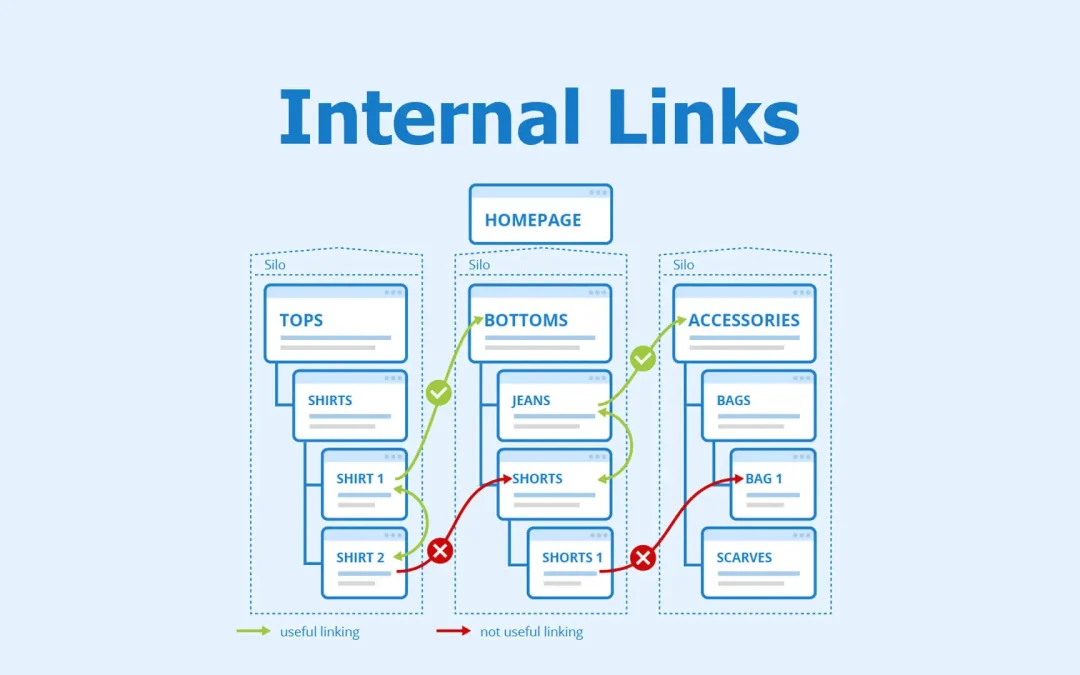
A logical hierarchy connects your content in a way that shows search engines your expertise. Many SEO experts suggest using a pyramid or hub-and-spoke model:
At the top: Pillar pages covering broad topics with high-volume keywords In the middle: Cluster pages that detail subtopics At the bottom: Specific content pages with long-tail keywords
This setup, known as a “silo structure,” groups related content into themed categories. Each silo focuses on one topic and connects related content through relevant internal links.
To name just one example, a main keyword like “coffee machine” could have cluster pages about “coffee machine with grinder” or “coffee machine for office use”. Cluster pages link to the pillar page, while the pillar page connects to all cluster content. Search engines see this pattern as proof that you offer complete information on the topic.
Content clusters do more than organize your site. They spread link equity among related pages and show search engines how your topics connect. This helps your entire topic cluster show up more in search results, not just single pages.
Building Topic Clusters and Content Hubs
Topic clusters mark the next step in internal linking strategy. They group content into thematic clusters instead of isolated pages. This approach improves your website’s structure and builds your topical authority in search engines.
Building Topic Clusters and Content Hubs
What is a topic cluster?
A topic cluster works as a content organization framework that groups interlinked webpages around a central subject. The structure connects related pages through internal links to create a detailed resource on a particular topic, rather than publishing disconnected content pieces.
The topic cluster model has three main components:
- Pillar page – A detailed resource that broadly covers the main topic and serves as the central hub
- Supporting cluster content – Individual pages that explore specific subtopics in depth
- Internal linking structure – The network that connects these pages together
Your website transforms from random articles into a knowledge base through this architecture. Topic clusters show search engines that your site provides authoritative, in-depth coverage of specific subjects when properly implemented.
How to create pillar and cluster pages
The right pillar topic starts your topic clusters. You need a topic broad enough to support multiple subtopics yet specific enough to link to your products or services. Look at your existing pages to find ones that could support your SEO topic cluster before creating new content.
Your pillar page should cover the broad topic. It needs to give an overview of all major aspects without going too deep into specifics. The best pillar pages run between 5,000 and 10,000 words and work as complete guides to the topic.
Your cluster content should:
- Target specific long-tail keywords related to the main topic
- Cover individual subtopics thoroughly
- Answer specific user questions
To name just one example, a pillar page about “coffee machines” could have cluster pages about “coffee machines with grinders” or “coffee machines for office use”. Each cluster page should explore that specific aspect while linking back to the broader topic.
Linking between cluster and pillar content
Internal linking forms the backbone of any successful topic cluster strategy. It turns a group of pages into an actual cluster. The hub-and-spoke model works best, where cluster pages link to the pillar page and back.
Your internal links between cluster and pillar content should follow these rules:
- Each cluster page must link to the pillar page
- The pillar page needs links to all cluster content
- Use the primary keyword as anchor text in pillar page links
These internal links need topical relevance and should help users. A cluster page about “how to swing a golf driver” naturally leads to questions about beginner-friendly drivers, creating a perfect link opportunity.
This linking pattern creates SEO benefits. Strong performance from one cluster page lifts the rankings of other linked pages. On top of that, it helps search engines understand your site’s structure and move link equity through related content more effectively.
Topic clusters and strategic internal linking build a strong foundation for user experience and search visibility. Your website becomes an authority in your field while creating natural navigation paths for visitors.
Using Anchor Text Effectively
The words you choose for internal links can make or break your SEO efforts. Your anchor text—those clickable words that form the hyperlink itself—acts as a vital signpost for users and search engines alike.
Using Anchor Text Effectively
What is anchor text?
Anchor text shows up as visible, clickable text in hyperlinks that users see on a webpage. You could call it digital signage that guides visitors through your site. Good anchor text tells users and search engines valuable information about the linked page and sets clear expectations. The words you pick for your anchor text send strong signals about content relevance and topic connections, whether you’re linking to your own pages or external resources.
Best practices for anchor text
Your anchor text should describe and relate to both its current page and its destination. Basic phrases like “click here” or “read more” don’t give context and waste valuable SEO opportunities.
The right anchor text should:
- Paint a clear picture of the destination page’s content
- Line up with the linked page’s purpose
- Use different wording for different page links
- Stay brief (about 2-5 words works best)
“Explore our complete list of cheese types” works much better than “Click here to learn about cheese”. This helps readers know what to expect and lets search engines understand the linked page’s topic.
The text around your links matters too. It gives search engines extra clues about relevance. Links shouldn’t stack up too close together – readers might get confused, and each link loses its context value.
Avoiding over-optimization
Descriptive anchor text matters, but too much keyword targeting can hurt you. Over-optimization happens when your internal links keep using similar anchor text. Search engines might see this pattern as unnatural or manipulative.
A balanced approach means you should:
- Broaden your anchor text with different words, synonyms, and related phrases
- Blend anchor text naturally into your content
- Keep exact-match keyword anchors to a minimum to stay clear of spam filters
A healthy internal linking profile needs various anchor text types. Branded terms and natural variations should show up more often than exact-match keywords. This mix of descriptive, varied anchor text helps both users and search engines navigate your site better.
Tools to Simplify Internal Linking
A solid internal linking strategy requires analyzing hundreds of pages. Specialized tools make this process quick and simple. These tools automate tedious manual work so you can focus on strategy instead of implementation.
Yoast SEO internal linking suggestions
Yoast SEO Premium includes a powerful internal linking suggestion tool that works right inside the WordPress editor. The tool scans your website and suggests related pages while you write content. You won’t need to search through old content manually, which makes link building much more efficient.
The tool analyzes your content to understand what your posts discuss and then suggests relevant linking opportunities. The Yoast sidebar displays up to five relevant suggestions including posts, pages, tags, or categories.
Yoast Premium also includes several specialized internal linking blocks:
- Breadcrumbs block to help users understand their location
- Related links block to add relevant articles quickly
- Subpages and Siblings blocks to connect hierarchical content
These features help distribute link equity and improve user navigation without requiring technical knowledge. Your site becomes easier to crawl as a result.
Using Semrush for link audits
Semrush’s Site Audit tool offers a detailed analysis of your website’s internal linking structure. You can view your link architecture through its Internal Linking Report in one central dashboard.
Internal LinkRank (ILR) forms the core of Semrush’s functionality. This metric measures each page’s importance within your site’s link structure on a scale of 0-100. You can use it to identify strong pages that pass authority to weaker ones.
The tool generates several useful reports:
- Internal Link Issues section shows problems and solutions
- Pages’ Crawl Depth graph displays accessibility from your homepage
- Internal Links distribution chart reveals potentially underlinked pages
- Pages passing the most Internal LinkRank value
These reports help you find orphaned pages and excessive linking. You can also spot opportunities to strengthen weak pages through strategic internal links.
Other helpful plugins and tools
Several other tools can improve your internal linking strategy.
Screaming Frog SEO Spider gives you technical depth to visualize site architecture. The tool crawls your website instantly to find broken links, analyze redirects, and extract data with XPath. Finding buried pages and underlinked important content becomes easier.
Rank Math’s free version includes solid internal linking features and provides contextual suggestions as you write. The tool combines smoothly with other SEO efforts, though it offers simpler features than dedicated solutions.
Website Internal Link Finder (WILO) supports manual optimization by displaying incoming links to any page and calculating internal linking scores. You retain control over your linking strategy without automated implementations.
Each tool offers distinct benefits based on your needs and technical expertise.
Fixing Common Internal Linking Issues
Your internal linking strategy needs regular maintenance. Time can erode your SEO efforts if you leave certain problems unchecked.
Orphaned pages
Orphaned pages exist as webpages that lack internal links from anywhere on your website. These disconnected pages become invisible to search engines and often miss getting indexed. These pages receive zero link equity, which makes them rank poorly in search results.
You can fix orphaned pages by:
- Using tools like Semrush Site Audit or Screaming Frog to spot them
- Checking if each page still matters
- Creating internal links from relevant content
- Adding important pages to navigation menus or XML sitemaps
Broken or redirected links
Broken internal links create dead ends that lead nowhere or return error codes. Users hate them, they waste crawl budget, and they block link equity flow. URL changes, deleted pages, or simple typos in link destinations usually cause these issues.
You have three main options to fix broken links:
- Set up a 301 redirect to a relevant page
- Fix the link to point to the right URL
- Delete the link if it’s no longer needed
Pages with low internal link count
Pages receive less link equity whatever their content quality might be if they have few internal links. Look for content that ranks well for keywords but has minimal internal links to find high-value yet under-linked pages.
Your site structure needs regular audits. Link to important pages from your highest-authority content to improve link distribution.
Conclusion
Internal links rank among the most powerful yet available SEO strategies for website owners today. This piece shows how these digital pathways serve vital functions – they improve crawlability, distribute link equity, and establish topical authority.
Your website transforms from isolated pages into an interconnected knowledge base when you implement internal links strategically. Both users and search engines can traverse it with ease. The topic cluster model offers a framework that organizes content logically. It signals expertise to search engines while creating natural pathways for visitors.
Descriptive anchor text is vital to this process. Specific and relevant anchor text helps users and search engines understand page relationships better than generic phrases like “click here.”
Regular maintenance of internal links should be part of your SEO routine. You need to find and fix orphaned pages, broken links, and underlinked content. Tools like Yoast SEO, Semrush, and Screaming Frog can make this process substantially easier.
Audit your existing structure to identify high-value pages and create meaningful connections between related content. These strategies will likely boost your rankings and increase organic traffic. Your engagement metrics will improve as search engines and visitors find more of your valuable content.
The beauty of internal linking lies in its simplicity. While complex SEO tactics need technical expertise, anyone can create a strategic internal linking plan that works well. Start small, stay consistent, and your website’s visibility and authority will grow steadily.
FAQs
Q1. What are the key benefits of internal linking for SEO? Internal linking improves website crawlability, distributes link equity, and helps build topical authority. It guides search engines to discover and understand your content, passes SEO value between pages, and signals comprehensive coverage of specific subjects.
Q2. How can I create an effective internal linking strategy? Start by mapping your site structure, identifying key pages, and creating a content hierarchy. Use descriptive anchor text, build topic clusters around pillar content, and ensure a logical flow of links between related pages. Regularly audit and update your internal links to maintain their effectiveness.
Q3. What tools can help simplify the internal linking process? Several tools can assist with internal linking. Yoast SEO Premium offers automated linking suggestions, Semrush provides comprehensive link audits, and Screaming Frog SEO Spider helps visualize site architecture. These tools can significantly streamline the process of implementing and maintaining an internal linking strategy.
Q4. How do I fix common internal linking issues? Address orphaned pages by adding relevant internal links to them. Fix broken links by redirecting, updating, or removing them. Improve pages with low internal link counts by linking to them from high-authority content. Regular site audits can help identify and resolve these issues.
Q5. What’s the importance of anchor text in internal linking? Anchor text plays a crucial role in internal linking by providing context to both users and search engines about the linked content. Use descriptive, relevant anchor text that accurately reflects the destination page’s content. Avoid generic phrases like “click here” and aim for natural, varied anchor text to prevent over-optimization.