
by yestupa | Dec 8, 2025 | Meta/Facebook Ads
Controlling ad spend is one of the most important levers in Meta / Facebook advertising. Set your budgets too low and you starve the algorithm of data. Set them too high and you burn through budget without a clear return.
The Meta / Facebook Ads Spend Calculator is designed to solve this problem in a simple, structured way. It helps you estimate your total campaign spend in seconds, model extra testing budget, and keep a neat record of your last five calculations—all in a clean, modern interface that works on any device.
If you manage Meta campaigns for your own brand or for clients, this Facebook ads spend calculator can quickly become part of your daily planning routine.
What Is the Meta / Facebook Ads Spend Calculator?
The Meta / Facebook Ads Spend Calculator is a lightweight online tool that estimates your total planned advertising spend based on:
- Daily budget
- Number of days you plan to run the campaign
- Optional extra testing budget (for creatives, audiences or new angles)
It automatically calculates:
- Base spend (daily budget × number of days)
- Extra testing spend
- Total planned spend
On top of that, the tool keeps a history of your last five calculations, so you can quickly compare different budget scenarios without going back to spreadsheets.
It is built with a modern, responsive layout, so you can comfortably use it on desktop, tablet, or mobile while you work inside Ads Manager, in client meetings, or on the go.
Why a Meta Ads Spend Calculator Matters
Budgeting for Meta ads is not just about “how much can we afford?”. It is a strategic decision that impacts:
- Learning phase performance – Underfunded campaigns struggle to exit the learning phase.
- Data quality – Consistent budgets produce cleaner, more reliable performance data.
- Cash flow and profitability – Planned spend must align with ROAS/CPA targets and overall marketing budget.
A dedicated Facebook ads budget calculator helps you:
- See the full picture upfront
Instead of guessing or doing rough mental math, you immediately know your total spend before launching a campaign.
- Avoid under- or over-spending
By combining daily budget, duration and testing budget, you can ensure your plan fits both your goals and financial constraints.
- Plan tests more deliberately
Many advertisers run “tests” without a clear allocation. With a clearly defined extra testing budget, you can allocate funds to creative and audience experiments without losing control of the core spend.
- Communicate clearly with stakeholders
Whether you are reporting to clients, management, or finance, a clear breakdown of planned spend makes conversations faster and more professional.
Key Features of the Meta / Facebook Ads Spend Calculator
This tool is designed specifically for performance marketers and media buyers. Core features include:
1. Clear separation of required and optional fields
The calculator distinguishes between must-fill and optional inputs:
- Required fields
- Campaign name
- Daily budget
- Number of days
- Optional fields
- Extra testing budget
- Currency code (e.g., USD, AUD, EUR)
This structure keeps the tool simple enough for quick estimates, but flexible enough for more advanced planning.
2. Instant spend breakdown
After you click “Calculate”, the tool displays:
- Base spend – daily budget × number of days
- Extra testing budget – if you decide to allocate additional spend
- Total planned spend – the full amount you expect to invest in the campaign
All amounts are shown with a currency label (default USD, or any currency code you enter).
3. Recent calculation history (max 5 records)
At the bottom, a results record table keeps your last five calculations, including:
- Time of calculation
- Campaign name
- Daily budget
- Number of days
- Extra testing budget
- Total planned spend
This makes it easy to:
- Compare different scenarios (e.g., 7 vs 30 days, with or without testing budget)
- Revisit previous plans for similar campaigns
- Show your planning logic during client or team discussions
The table automatically removes the oldest entry once there are more than five records, keeping the history neat and compact.
4. Modern, responsive design
The interface is:
- Modern and clean – suitable for embedding in a professional website or client resource hub
- Fully responsive – optimised for desktop, tablet and mobile
- Easy to read – clear typography, structured layout, and intuitive labels
This makes the Meta ads spend calculator practical for everyday use, not just a one-off novelty tool.
How to Use the Facebook Ads Spend Calculator (Step by Step)
Using the tool is straightforward:
- Enter your campaign name
For example: “Q1 Prospecting – US”, “Retargeting – Cart Abandoners”, or “Lookalike Test 1% – AU”.
- Set your daily budget
Type in the daily budget you plan to allocate in Meta Ads Manager (e.g., 100, 250, 500).
- Specify the number of days
Enter how many days you intend to run the campaign or ad set (for example, 7, 14, or 30).
- Add an optional extra testing budget
If you want to reserve additional budget for testing creatives, audiences or placements, add this as a separate amount. If you leave it blank, the tool will treat it as zero.
- Choose or leave the default currency
You may enter a currency code (e.g., USD, AUD, GBP, EUR). If you leave this field empty, the calculator will label amounts as USD by default.
- Click “Calculate”
The tool instantly shows you:- Base spend
- Extra testing spend
- Total planned spend
At the same time, a new record is added to the Recent calculations table.
- Compare and refine
Adjust the daily budget, days, or testing budget to model different scenarios (e.g., increasing budget during peak season or extending the duration of a winning campaign).
Practical Use Cases for Media Buyers and Marketers
This Meta / Facebook ads budget calculator fits smoothly into several workflows:
1. Client proposals and audits
When scoping a new Meta ads retainer or preparing an audit, you can:
- Quickly show projected monthly spend
- Differentiate between always-on spend and testing budget
- Back up your budget recommendations with clear numbers
2. Internal planning and approvals
If you manage performance marketing in-house, the calculator helps you:
- Align with finance on exact planned spend per campaign
- Prevent unplanned budget creep caused by multiple small tests
- Build a transparent record of planned allocations
3. Scenario planning for seasonal campaigns
For seasonal bursts (Black Friday, Christmas, end-of-year sales, product launches), you can use the calculator to:
- Compare different campaign durations
- Understand the impact of raising daily budgets vs extending the run time
- Ensure your total spend remains within the overall seasonal budget
4. Training junior media buyers
The Facebook ads spend calculator is also a simple educational tool. It visually connects:
- Daily budget
- Number of days
- Total spend
This helps junior team members better understand how their budget decisions translate into real money.
Best Practices When Using the Meta Ads Budget Calculator
To get more value from the tool, consider the following best practices:
- Tie spend to performance targets
Use your target CPA, ROAS or MER to check whether the planned spend makes sense relative to expected revenue.
- Separate “core” and “test” budgets
Keep your always-on campaigns stable, and ring-fence testing budget so experiments do not destabilise your main performance lines.
- Review history before approving new budgets
The built-in history table lets you quickly recall what you planned for previous campaigns. Use that as a benchmark when planning new ones.
- Re-calculate after major strategy changes
If you change objectives, geos, or add new audiences, revisit your calculations to ensure the planned spend still matches your strategy.
Start Planning Smarter Meta / Facebook Ad Budgets Today
The Meta / Facebook Ads Spend Calculator is a practical, SEO-friendly tool built to streamline budget planning for Meta campaigns.
By combining a clear interface, required and optional inputs, automatic calculations, and a five-record history table, it helps you:
- Plan your spend with confidence
- Communicate budgets clearly to stakeholders
- Run more disciplined tests without losing control of your core investment
Add this Facebook ads spend calculator to your toolkit and make budget planning a fast, reliable part of your Meta advertising workflow.
by yestupa | Dec 8, 2025 | Backlinks Tips
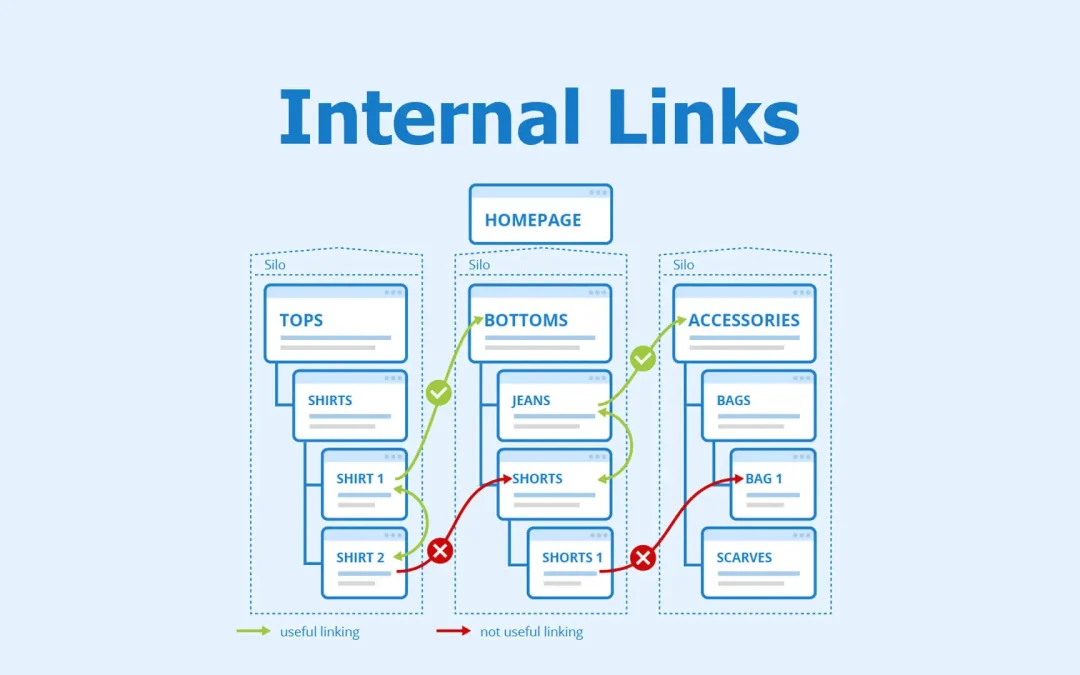
Most SEO practitioners treat internal linking as an afterthought — something you do after publishing, if you remember. That’s a missed opportunity. Internal links are among the few ranking levers you fully control, and in 2026, their role has expanded beyond traditional organic search into AI-generated answers, LLM citability, and generative search surfaces.
This guide covers the complete internal linking workflow: the mechanics of how link equity actually flows, how to build topic clusters that compound authority, the specific numbers and ratios that matter, a repeatable audit process, and how to scale it all when your site grows past the point where manual linking is viable.
What Internal Links Actually Do (and Why the Basics Still Win)
Internal links are hyperlinks connecting one page on your domain to another. That definition hasn’t changed, but what they accomplish has gotten more layered.
At the crawl level, internal links are how Googlebot discovers pages. Google has been direct about this: every page you care about should be linked from at least one other page on your site. Pages with no internal links — orphan pages — may never get crawled or indexed, regardless of content quality. A JetOctopus large-site case study found that revising internal linking architecture moved Googlebot crawl coverage from approximately 40% of pages to 70%, a roughly 30 percentage-point improvement from linking changes alone.
At the authority level, internal links distribute link equity (the ranking power derived from backlinks and other signals) across your site. Your homepage typically accumulates the most equity because it attracts the most external links. Every internal link from that homepage to a subpage transfers a portion of that authority. The same principle applies from any high-authority page to any lower-authority one.
At the semantic level, internal links tell search engines how your content relates. A cluster of pages about email marketing, all interlinked, signals depth and expertise in that topic. This is the foundation of topical authority — and in 2026, it’s also the foundation for being cited in AI-generated search results.
The practical upside for users is just as concrete: internal links keep visitors moving through your site, reduce bounce rates, and guide them toward conversion pages. These are engagement signals that search algorithms weigh, creating a feedback loop where good linking improves rankings, which drives more traffic, which generates more engagement data.
Internal Links in the Age of AI Search
This is the section most existing guides skip, and it’s the most strategically important addition for 2026.
Google AI Overviews now appear on roughly 30-47% of U.S. search queries (depending on the data source), and organic click-through rates drop by an average of 34.5% when an AI Overview appears. However, being cited inside an AI Overview increases a page’s organic CTR by about 35% compared to not being cited. The implication is clear: the new visibility game is citation, not just ranking.
Internal linking plays a direct role here in three ways.
Crawl accessibility for AI indexing. AI search systems — whether Google’s AI Overviews, ChatGPT’s web search, or Perplexity — rely on crawlable, well-structured sites to source information. If your pages are orphaned or buried at 5+ click depth, AI systems are less likely to encounter and cite them. The same linking architecture that helps Googlebot helps AI crawlers.
Topical authority signals. AI Overviews consistently cite content that demonstrates comprehensive topic coverage. Research from Surfer SEO shows that the typical AI Overview-cited article covers 62% more facts than a non-cited one. Topic clusters connected by internal links are the structural mechanism that proves comprehensive coverage. A single standalone article on “email marketing” is less likely to be cited than a pillar page surrounded by 15 interlinked cluster articles covering segmentation, deliverability, automation, analytics, and A/B testing.
Semantic clarity for extraction. LLMs parse content more effectively when the information architecture is predictable. Clear heading hierarchies, contextual internal links with descriptive anchor text, and logical page relationships all make your content easier for AI systems to interpret, extract, and attribute accurately. Schema markup helps clarify meaning, but Google has been explicit that structured data does not substitute for HTML links when it comes to passing equity and enabling discovery.
If you’re building an internal linking strategy in 2026, you’re building it for two audiences simultaneously: traditional search crawlers and AI/LLM systems. The good news is that the requirements overlap almost entirely — well-structured, deeply interlinked, semantically clear content wins on both fronts.
Types of Internal Links and Where Each One Fits
Not all internal links carry equal weight. Understanding the hierarchy helps you allocate effort where it matters most.
Contextual links — embedded within body content, inside paragraphs — are the highest-value internal link type. Search engines treat them as editorial endorsements: someone deliberately chose to reference that page in the context of a related discussion. Multiple contextual links pointing to one page amplify the signal that the page is important and relevant.
Navigational links — main menus, header navigation, mega menus — define your site’s primary structure. They appear on every page, which means they pass equity broadly but thinly. A global nav with 40+ links dilutes the equity each link carries. Keep main navigation focused on your most important category pages.
Sidebar and related-post links sit between navigational and contextual in terms of SEO impact. They’re useful for keeping users engaged and surfacing content that doesn’t fit in the main nav, but search engines give them less weight than in-body contextual links.
Breadcrumb links serve a dual purpose: they show users their location in the site hierarchy and give search engines an explicit crawl path. Google renders breadcrumb structured data in search results, but the HTML breadcrumb links themselves are what carry equity. Implement both the visible breadcrumb trail and the corresponding Schema markup.
Footer links are the lowest-priority internal link type. Google has historically treated excessive footer links as potential spam signals — a penalty wave in 2013 targeted sites with 50+ keyword-rich footer links. Use footers for utility pages (privacy policy, contact, terms of service) and a handful of key pages, not as a link farm.
How Link Equity Actually Flows: The Mechanics That Matter
Most guides explain link equity as “authority passes from page to page through links.” That’s true but incomplete. Several mechanics affect how much equity actually reaches the destination.
The dampening factor. Google’s original PageRank formula includes a dampening factor of 0.85, meaning roughly 15% of equity dissipates at each hop. A page three clicks deep from a high-authority source receives meaningfully less equity than one directly linked. This is why flat site architecture — keeping important pages within 2-3 clicks of the homepage — has a real mathematical basis, not just a UX one.
Link count dilution. A page’s total equity is divided among all outgoing links on that page. A page with 20 outgoing links passes roughly 5x more equity per link than a page with 100 outgoing links. This matters for navigation menus: a mega menu with 80+ links on every page creates systemic equity dilution across your entire site. Streamlining navigation concentrates equity on the pages that need it most.
Position on page. Links placed higher in the content — within the first few paragraphs — carry more weight than links buried at the bottom. Google’s own documentation and several SEO experiments confirm this. When you’re strategically linking to a priority page, place that link early in the article, not as an afterthought at the end.
First-link priority. When a page links to the same destination URL multiple times, Google typically only counts the first link (in HTML order) for PageRank purposes. If you link to your pricing page from both the nav and the body content, the nav link (which appears first in HTML) is the one that carries anchor text signals. Plan your anchor text accordingly.
Why nofollow doesn’t help internally. Some SEOs still try to “sculpt” PageRank by adding rel=”nofollow” to internal links they consider low-priority (login pages, etc.). This doesn’t work as intended. The equity that would have gone to the nofollowed link doesn’t get redistributed to other links — it effectively evaporates. Matt Cutts confirmed this years ago, and the guidance hasn’t changed. If a page doesn’t deserve a link, don’t link to it. But don’t nofollow internal links as a distribution strategy.
Building Topic Clusters That Compound Authority
The topic cluster model — a pillar page surrounded by interlinked cluster content — has become the standard internal linking architecture for content-driven sites. It works because it aligns with how both search engines and AI systems evaluate topical depth.
Choosing your pillar topic. A pillar should be broad enough to support 10-20 subtopic pages, but specific enough to have clear keyword targeting. “Digital marketing” is too broad. “Email marketing for ecommerce” is a viable pillar. Before creating new content, audit what you already have — you may already have 15 articles on a topic that just need to be connected.
Structuring the pillar page. The pillar page should be a comprehensive overview (typically 3,000-5,000 words) that covers all major aspects of the topic at survey depth. It links out to every cluster page for detailed treatment of each subtopic. Think of it as a table of contents with substance — each section gives enough context to be useful on its own, then links to the deep-dive article.
Cluster content requirements. Each cluster page targets a specific long-tail keyword and covers its subtopic thoroughly. A pillar page about “PPC campaign management” might have cluster pages on “negative keyword strategy,” “Quality Score optimization,” “ad copy testing frameworks,” “budget pacing techniques,” and “campaign structure for ecommerce.”
The linking rules that make clusters work:
- Every cluster page links to the pillar page (using the pillar’s primary keyword or a close variant as anchor text)
- The pillar page links to every cluster page
- Cluster pages link to 2-3 related cluster pages within the same topic (not just back to the pillar)
- Use descriptive, varied anchor text for cross-cluster links
This bidirectional linking creates a closed authority loop. When any single cluster page earns an external backlink, the equity flows through internal links to the pillar and to sibling cluster pages. One strong backlink to a subtopic article lifts the rankings of the entire cluster.
A real-world pattern: A Semrush case study from 2025 showed that a SaaS startup with well-organized, contextually relevant internal linking outperformed a competitor with similar domain authority by more than 4x in monthly organic traffic. The difference was structural: the winning site used disciplined topic clusters while the competitor linked between unrelated pages.
Anchor Text Strategy: Specific Ratios, Not Vague Advice
Anchor text tells search engines what the destination page is about. Vague anchors like “click here” or “read more” waste that signal entirely. But over-optimizing with exact-match keyword anchors triggers algorithmic penalties.
The competitive consensus in 2026 points to these approximate distributions for internal anchor text:
- Exact-match keyword anchors: 20-30% of your internal links. Use them, but don’t overdo it. “Internal linking strategy” pointing to your internal linking guide is appropriate — just not on every single link to that page.
- Partial-match / long-tail variants: 30-40%. “How to improve your internal linking,” “strategies for internal link optimization,” “building better internal links.” These provide topical relevance with natural variation.
- Branded, URL, or generic anchors: 10-15%. “Our guide,” “this resource,” your brand name. These feel natural and break up keyword-heavy patterns.
- LSI / entity-related terms: 20-30%. “Crawl depth optimization,” “link equity distribution,” “site architecture for SEO.” These terms are semantically related but not direct keyword matches, which adds topical breadth.
If you audit your existing anchors and find that exact-match anchors exceed 25% for any single destination page, diversify immediately. Use Ahrefs’ Internal Backlinks report or Screaming Frog’s anchor text analysis to check your current distribution.
The surrounding text matters too. Search engines read the sentences around your link for additional context. A link to “keyword research tools” embedded in a paragraph about content strategy sends a weaker signal than the same link in a paragraph specifically discussing keyword research workflows.
Link Density: How Many Internal Links Per Page
There’s no official Google limit on internal links per page, but practical guidelines have emerged from testing and large-site experience.
For body content: aim for 2-5 contextual internal links per 1,000 words. For a 2,000-word article, that’s roughly 4-10 contextual links — enough to create useful connections without overwhelming the reader or diluting equity excessively.
For total links per page (including navigation, sidebar, footer, and body): keep the count under 150. Beyond that, Google may not follow all links, and equity gets diluted to the point where individual links carry negligible weight. Most well-structured sites stay well below this threshold.
Spacing matters. Distribute links evenly through the content rather than clustering them in one section. A paragraph with four links and four paragraphs with no links creates an uneven reading experience and concentrates signals in one spot.
Don’t force links. Every internal link should answer a plausible reader question or provide genuinely useful context. A link exists to serve the reader’s next logical step — not to hit a link count target.
A Repeatable Internal Link Audit Process
An internal linking strategy decays over time. New content publishes without links, old URLs break, redirects chain up, and priority pages drift deeper in the site hierarchy. A quarterly audit (with monthly spot checks for broken links) keeps the system healthy.
Step 1: Crawl the full site.
Use Screaming Frog (or Sitebulb, or Ahrefs Site Audit) in Spider mode with link crawling enabled. This produces a complete dataset of every URL, its inlinks (internal links pointing to it), outlinks (internal links it sends), response codes, and crawl depth.
Step 2: Find orphan pages.
Export your crawl data and compare it against your XML sitemap. URLs in the sitemap but missing from the crawl are likely orphaned — they exist but no internal link leads to them. In Screaming Frog, you can cross-reference the sitemap crawl with the spider crawl to surface these. In Ahrefs, the Site Audit dashboard has a dedicated Orphan Page report. Every orphan page is either a page that needs internal links added, or a page that should be removed or redirected.
Step 3: Identify underlinked high-value pages.
Sort your crawl export by inlink count, then cross-reference with your priority pages (product pages, service pages, conversion pages, pillar content). Any priority page with fewer than 5-10 contextual internal links is underlinked. In Semrush’s Site Audit, the Internal LinkRank (ILR) metric scores each page’s importance within your link structure on a 0-100 scale — pages with high commercial value but low ILR need attention.
Step 4: Fix broken links and redirect chains.
In Screaming Frog, filter the Response Codes tab for “Internal Client Error (4xx)” to find all broken internal links. For each one, either fix the destination URL, set up a 301 redirect to the correct page, or remove the link. Then check for redirect chains — internal links that point to URLs that redirect to other URLs that redirect again. Each hop in a redirect chain loses equity and slows crawl efficiency. Update the link to point directly to the final destination URL.
Step 5: Check crawl depth.
Use Screaming Frog’s Site Structure tab to see how many clicks each page is from the homepage. Any priority page at 4+ clicks depth needs to be linked from a higher-level page. The target: all important pages reachable within 3 clicks.
Step 6: Audit anchor text distribution.
Export all anchor text data from your crawl tool and analyze the distribution for your top 20 priority pages. Flag any page where exact-match anchors exceed 25% of total internal links. Diversify by rewriting some anchors to partial-match or semantically related terms.
Step 7: Find unlinked keyword mentions.
Use Screaming Frog’s Custom Search feature (Configuration > Custom > Custom Search) to search your site’s body text for mentions of target keywords that aren’t inside anchor tags. Set the filter to “Page Text (No Anchors)” and search for your pillar page’s primary keyword. Every page that mentions the term without linking to the pillar is a free linking opportunity.
Scaling Internal Linking: Automation Tools and Programmatic Approaches
Manual internal linking works for sites with fewer than 100-200 pages. Beyond that, you need systems.
WordPress plugins for semi-automated linking:
- Link Whisper uses AI-powered content analysis to suggest relevant internal links as you write and for existing content in bulk. It’s the most widely used automation tool for WordPress sites and handles both new-post suggestions and site-wide link opportunity scanning.
- Rank Math (free version) provides contextual link suggestions in the editor sidebar, though it’s less comprehensive than Link Whisper for site-wide analysis.
- Internal Link Juicer automates link creation based on keyword-to-URL mappings you define, useful for sites with predictable keyword-to-page relationships.
Dedicated internal linking platforms:
- Linkbot connects audit findings directly to implementation, with features like dynamic funnel links and indexation workflows. Useful for sites that need to bridge the gap between “analysis spreadsheet” and “actual link changes.”
For programmatic SEO at scale:
If you’re generating hundreds or thousands of pages from templates and data (location pages, product comparison pages, integration pages), internal linking must be built into the template, not added after publication. Every programmatic page should automatically link to its parent hub page and 3-5 related sibling pages. Anchor text should pull from the target page’s primary keyword field in the database. Without this template-level linking, programmatic pages quickly become orphaned at scale — invisible to both search engines and AI systems.
Enterprise crawl-and-link tools:
Semrush Site Audit, Ahrefs Site Audit, and Screaming Frog all provide internal linking reports that work at enterprise scale. For continuous monitoring (versus periodic audits), Semrush’s scheduled crawls and Ahrefs’ automated site audit alerts catch new issues as they appear.
JavaScript, Rendering, and Technical Considerations
A few technical factors can silently undermine your internal linking strategy.
JavaScript-rendered links. If your internal links are generated via client-side JavaScript (common in React, Vue, and Angular SPAs), Googlebot may not follow them reliably. Google renders JavaScript, but with a delay and not always perfectly. If your key internal links only exist in the rendered DOM and not in the initial HTML, they may not pass equity. Use standard HTML anchor tags for critical internal links whenever possible.
Schema markup is not a link substitute. Breadcrumb Schema (BreadcrumbList) helps Google display breadcrumbs in search results, but Google has stated it does not treat URLs in structured data the same as HTML links for PageRank purposes. You need both: HTML breadcrumb links for equity flow and Schema markup for SERP presentation.
Crawl budget for large sites. Google’s crawl budget guidelines specifically target sites with 1M+ pages changing weekly or 10K+ pages changing daily. If your site is in that range, internal linking directly affects what percentage of your pages get crawled in each session. Faster server response times also help — Google’s crawl rate adapts to how quickly your server responds, so page speed is indirectly a linking concern.
Common Internal Linking Mistakes (and How to Fix Them)
Orphan pages. Pages with zero internal links are invisible to crawlers and receive no link equity. Fix: run an orphan page audit quarterly and add contextual links from topically related content.
Linking to irrelevant pages. A link from a page about email marketing to a page about car insurance confuses semantic signals. Fix: only link between topically related content. The Semrush case study mentioned earlier showed that contextually relevant linking outperformed random linking by a factor of 4x in organic traffic outcomes.
Over-optimized anchor text. Using the same exact-match keyword anchor on every link to a page looks manipulative. Fix: diversify to the ratios outlined in the anchor text section above.
Burying links at the bottom. Links placed in the last paragraph get less weight than links in the first few paragraphs. Fix: place your most important contextual links early in the content.
Ignoring new content. Publishing a new article without immediately linking to it from existing related content is the most common source of orphan pages. Fix: make “add internal links from 3-5 existing articles” a required step in your publishing workflow.
Excessive links on every page. Mega menus with 80+ links, sidebars packed with “related posts,” and footers stuffed with keyword links all dilute equity. A SearchPilot A/B test found that reducing the number of links in a link block on a page improved the rankings of the remaining linked-to pages. Fix: streamline navigation and be deliberate about sidebar/footer link counts.
Redirect chains in internal links. Internal links that point to URL A, which 301-redirects to URL B, which 301-redirects to URL C, lose equity at each hop and waste crawl budget. Fix: update the link to point directly to the final destination URL.
Putting It All Together: Implementation Priority
If you’re starting from scratch or revamping an existing site, here’s the order that typically delivers the fastest results:
- Run a full crawl and fix broken links first. This removes obstacles before you start building.
- Identify and link orphan pages. Getting existing content into the crawl path is the lowest-effort, highest-impact move.
- Map your topic clusters. Group existing content into themes and identify pillar pages. Create pillar content where gaps exist.
- Build bidirectional cluster links. Connect every cluster page to its pillar and to 2-3 sibling pages.
- Redistribute equity from high-authority pages. Find your pages with the most external backlinks and add contextual links from them to your priority conversion/product pages.
- Establish a publishing workflow. Every new article must include internal links to related existing content, and existing content must be updated to link to the new article.
- Set up quarterly audits. Crawl, check for orphans, fix broken links, review crawl depth, audit anchor text distribution.
Internal linking compounds. Each new article, each new link, each audit cycle tightens the web. Sites that treat it as ongoing architecture — not a one-time project — consistently outperform those that don’t.
by yestupa | Dec 7, 2025 | SEO
B2B SEO is the process of building organic visibility for the queries that business buyers and buying committees use to discover, evaluate, and choose solutions. Unlike consumer SEO, it has to account for longer sales cycles, multiple stakeholders, and purchase decisions involving significant organizational risk. And the metric that proves it’s working isn’t traffic or rankings — it’s qualified pipeline and closed revenue.
That distinction matters because it changes every strategic decision. Which keywords you target, how you structure content, what you measure, and how you justify the investment all look different when the goal is pipeline influence rather than pageviews.
The landscape has shifted further in recent years. Over half of all Google searches now end without a click, as AI Overviews answer queries directly. Buyers form shortlists inside AI-generated summaries before they ever visit your website. The “rank → click → form fill” playbook that defined B2B SEO for a decade is structurally weakened. What replaces it is a visibility and trust system that spans traditional search results, AI-generated answers, and the peer validation surfaces (review sites, communities, analyst reports) that buying committees actually trust.
This guide covers the full B2B SEO strategy: how it differs from B2C, buyer persona development, keyword research by intent tier, content architecture, product page optimization, technical foundations, link building, AI visibility optimization, and measurement tied to business outcomes.
How B2B SEO Differs from B2C
The technical mechanics of SEO — crawling, indexing, ranking signals — are the same regardless of audience. What changes in B2B is the application.
Decision-maker complexity. B2B purchases involve a buying committee of four to ten people. A VP of Engineering evaluates technical fit, a CFO evaluates cost, procurement evaluates vendor risk, and end users evaluate usability. Your content needs to address multiple stakeholders with different concerns, not a single consumer making an individual choice.
Search behavior. B2B buyers spend roughly 27% of their buying journey on independent online research and only 17% talking to potential suppliers. They search with specific business problems in mind — “how to reduce manufacturing downtime” or “API gateway security best practices” — not with product names. By the time they’re ready to talk to your sales team, they’ve already built a shortlist.
Conversion definition. In B2C, a conversion is typically a purchase. In B2B, a “conversion” is a micro-step in a long process: a whitepaper download, a demo request, a consultation booking. These are entry points into a sales cycle that takes months to close. What matters isn’t how many forms get filled — it’s how many of those form fills become qualified pipeline.
Keyword economics. B2B keywords tend to have lower search volume but higher commercial value per visitor. “Enterprise resource planning implementation partners” gets a fraction of the searches that “running shoes” gets, but a single conversion from that query might be worth $500,000 in annual contract value.
Content expectations. B2B audiences expect depth, specificity, and demonstrated expertise. Surface-level blog posts don’t satisfy buyers who are building a business case for a six-figure purchase. Research shows that in-depth guides of 2,500+ words consistently outperform shorter content in B2B search results because they provide the comprehensive information decision-makers need.
Build Your Ideal Customer Profile and Buyer Personas
B2B SEO strategy starts with knowing exactly who you’re trying to reach. Targeting “businesses” is too vague. You need to define the specific companies (ICP) and the specific people within those companies (buyer personas) that your content and keywords should attract.
Ideal Customer Profile (ICP)
Your ICP defines the type of company that gets the most value from your product and generates the highest lifetime value for your business. It includes industry vertical, company size (employee count and revenue), geographic market, technology stack, and common business challenges your solution addresses.
Analyze your existing customer base to build your ICP. Which customers have the highest retention? Which close fastest? Which generate the most revenue? The patterns in your best customers define who your SEO should attract more of.
Buyer Personas
Within each ICP company, multiple people influence the purchase. Build personas for each role:
The Champion — the person who discovers your solution and advocates internally. Often a mid-level manager or director. They search for problems and solutions, not vendors.
The Decision Maker — the executive who signs off on the purchase. They search for ROI, competitive comparisons, and vendor credibility. They want proof that your solution delivers measurable business outcomes.
The Technical Evaluator — the person who assesses whether your solution integrates with existing systems and meets technical requirements. They search for documentation, API specs, integration capabilities, and implementation details.
The End User — the person who’ll use your product daily. They search for ease of use, training resources, and feature-specific comparisons.
Each persona searches differently, cares about different things, and needs different content. Your keyword research and content strategy should map to all of them, not just the one who’s easiest to reach.
ICP-Aligned Content Architecture
This is one of the most underused B2B SEO tactics: organize your content around your ICP segments, not just around keywords or funnel stages.
If you serve three industries — healthcare, financial services, and manufacturing — build dedicated content clusters for each. A generic “How to Improve Data Security” article competes with every security vendor on the internet. “Data Security Compliance for Healthcare Organizations: A HIPAA-Focused Guide” speaks directly to one ICP segment and faces dramatically less competition.
Create solution pages, case studies, and guides segmented by vertical and use case. This signals topical authority within each segment and ensures that when a healthcare CTO searches for security solutions, they land on content that speaks their language and addresses their specific regulatory environment.
Keyword Research: Intent Tiers for B2B
B2B keyword research differs from B2C in one fundamental way: volume matters less than intent quality. A keyword with 50 monthly searches that generates qualified pipeline is more valuable than a keyword with 10,000 searches that attracts students and job seekers.
Bottom-of-Funnel Keywords (Highest Priority)
These keywords signal active purchase evaluation. They include product-specific terms (“enterprise CRM pricing”), comparison queries (“HubSpot vs Salesforce for mid-market”), vendor evaluation terms (“best ERP for manufacturing”), and action-intent phrases (“request demo,” “get a quote,” “free trial”).
Bottom-funnel keywords typically have high CPC values — often $5-$50+ per click in Google Ads. That CPC reflects their commercial value. Even though these terms may show low search volume (50-500 monthly searches), each visitor they attract is significantly more likely to become pipeline.
Filter your keyword research by CPC to identify high-commercial-value terms. A keyword with 100 monthly searches and a $25 CPC is almost certainly more valuable to a B2B company than a keyword with 5,000 searches and a $0.50 CPC.
Mid-Funnel Keywords (Category and Capability Terms)
Mid-funnel keywords describe solutions without naming specific vendors. They fall into two groups:
Category keywords combine the product type with an industry or company qualifier: “HR software for SaaS companies,” “project management tool for construction,” “accounting software for nonprofits.”
Capability keywords focus on specific features: “CRM with lead scoring and automation,” “project management tool with Gantt charts,” “invoicing software with Xero integration.”
These keywords attract prospects who know what category of solution they need but haven’t settled on a specific vendor. They’re actively building a consideration set — exactly where you want to enter the conversation.
Top-of-Funnel Keywords (Problem-Aware)
Top-funnel keywords address the problems your product solves, not the product itself. They’re informational: “how to reduce employee onboarding time,” “why is our supply chain inefficient,” “improve team collaboration across remote offices.”
These keywords won’t produce immediate leads, but they build awareness with prospects who will eventually enter a buying cycle. B2B buyers who consume educational content during their research phase are significantly more likely to include that brand in their shortlist.
Building Your Negative Keyword Profile
In B2B, knowing which terms to exclude is as important as knowing which to target. Build lists of terms that attract the wrong audience: job titles and career terms (“salary,” “jobs,” “careers,” “intern”), academic terms (“thesis,” “case study PDF,” “research paper”), DIY and free alternatives (“free,” “open source,” “template,” “how to build your own”), and consumer-intent terms that overlap with your B2B keywords.
Content Strategy: The Pillar-Cluster Model for B2B
Isolated blog posts targeting random keywords don’t build topical authority. A pillar-cluster model creates interconnected content networks that signal depth and expertise to both search engines and AI systems.
How It Works
A pillar page covers a broad topic comprehensively — “The Complete Guide to B2B Lead Generation” — in 3,000-5,000 words. Cluster articles address specific subtopics in depth: “How to Build a B2B Lead Scoring Model,” “Email Nurture Sequences for Enterprise Leads,” “Cold Outreach vs. Inbound for B2B SaaS.” Every cluster article links back to the pillar page, and the pillar links out to every cluster.
This structure does two things: it tells search engines that your site has comprehensive, authoritative coverage of a topic (boosting rankings for the competitive head term on the pillar), and it creates navigation paths for users who want to go deeper on specific subtopics.
Resource Allocation: The Corpus of Content Approach
Most B2B marketing teams have limited content resources. The Corpus of Content model provides a practical framework: identify the 50-200 keywords most commercially valuable to your business, create content that targets each one while fulfilling search intent and meeting quality standards, and treat updating existing content as equally important to creating new content — Google favors authoritative, frequently updated pages.
This approach concentrates effort on the keywords that actually generate pipeline rather than producing a high volume of content targeting progressively less valuable terms.
Practical publishing cadence for most B2B teams: 4-8 pieces per month, focused on one topic cluster at a time. Build depth in your core areas before expanding breadth.
Competitor Comparison Pages
“Vs” pages and “alternative to” pages are among the highest-converting content types in B2B. A prospect searching “Salesforce alternatives for small teams” has explicit purchase intent and is actively evaluating options — including yours.
Build dedicated comparison pages for your top three to five competitors. Be honest about where competitors are stronger and where you differentiate. Transparently acknowledging competitor strengths builds more trust than one-sided comparisons that prospects can see through. Include feature comparison tables, pricing positioning, ideal customer fit, and migration guidance.
Product and Service Page Optimization
Product pages are where organic traffic converts into pipeline. Every B2B product page needs to accomplish three things: match the search intent that brought the visitor there, provide enough information for a committee member to build an internal case, and offer a clear path to the next step.
Content Depth
Most B2B product pages are too thin. A few bullet points and a “Request Demo” button don’t give decision-makers the information they need to evaluate your solution. Aim for 1,500-2,500 words of unique content per product page. Include detailed feature descriptions tied to business outcomes, technical specifications and integration capabilities, use case scenarios relevant to your ICP, customer results with specific metrics, and an FAQ section that addresses common objections.
Place your primary keyword in the H1 headline, title tag, URL, meta description, and naturally throughout the body content. Use related terms and synonyms to build topical relevance without keyword stuffing.
CTAs That Match the Buying Stage
Not every product page visitor is ready to “Request a Demo.” Some are early in research and want to download a comparison guide. Others are technical evaluators who want API documentation. A single CTA misses the majority of your audience.
Include multiple conversion paths: a primary CTA for bottom-funnel visitors (demo request, free trial), a secondary CTA for mid-funnel visitors (download case study, watch product walkthrough), and a lightweight option for early-stage researchers (subscribe to newsletter, read the guide).
Technical SEO Foundations for B2B
B2B websites — especially SaaS platforms with dynamically generated pages, customer portals, and gated content — face specific technical SEO challenges.
Crawl Budget Management
Large B2B sites with thousands of pages (documentation, support articles, blog content, product pages) need careful crawl budget allocation. Ensure your most important commercial pages are crawled frequently by linking to them from your main navigation, including them in your XML sitemap, and avoiding internal links that dead-end in low-value pages.
Block client-facing dashboards, login pages, and staging environments from crawling via robots.txt. These pages consume crawl budget without adding SEO value.
Gated Content Handling
B2B sites frequently gate content behind forms — whitepapers, reports, templates. Search engines can’t crawl content behind a form. If a gated PDF contains your best content on a topic, Google can’t see it.
The solution: create an ungated landing page with a substantial preview or summary of the gated content (500-1,000 words) that targets the relevant keyword. The page ranks, attracts organic traffic, and the gated asset serves as the conversion mechanism.
Core Web Vitals
LCP under 2.5 seconds, INP under 200 milliseconds, CLS under 0.1. These are Google’s performance thresholds. For B2B sites, the most common technical issues are unoptimized images on product pages, heavy JavaScript from marketing automation tools and chatbots, and third-party scripts that block main-thread execution.
HTTPS and Security
Non-negotiable for any B2B site handling lead information. HTTPS is a confirmed ranking signal and a trust requirement for business buyers evaluating vendor credibility.
Building High-Quality Backlinks
Backlinks remain a core ranking factor. For B2B companies, the most effective link building strategies leverage your unique expertise and business relationships.
Original research and data. Conduct industry surveys, analyze your proprietary data, or publish benchmark reports. Original data attracts citations from journalists, analysts, and other content creators. A single well-promoted research report can generate hundreds of referring domains.
Digital PR. Pitch expert commentary to industry publications when relevant news breaks. Offer your executives as sources on HARO (now Connectively) and similar platforms. Company milestones, product launches, and funding announcements generate press coverage with backlinks.
Guest content on industry publications. Contribute genuinely useful articles to publications your target audience reads. The goal is establishing expertise, not dropping a link — but authoritative guest posts naturally earn contextual backlinks.
Free tools and calculators. Build interactive tools that solve specific problems for your audience. An ROI calculator, a pricing estimator, or a compliance checklist attracts both users and links from sites that reference the tool.
Partnership and co-marketing content. Joint webinars, co-authored research, and partner resource pages create natural backlink opportunities from trusted domains in your ecosystem.
Generative Engine Optimization (GEO) for B2B
GEO is now a parallel track to traditional SEO, not a future trend. A growing share of B2B buyer research happens inside AI interfaces — ChatGPT, Perplexity, Google AI Overviews, and Gemini — where your brand can influence a shortlist without ever earning a click.
The data tells the story: organic CTR drops 61% when an AI Overview appears for a query. But AI-referred visitors convert at roughly 14% — nearly five times the 2.8% conversion rate of traditional organic traffic. Buyers arriving from AI typically already have a shortlist and a budget. They’re closer to RFQ than top-of-funnel SEO traffic.
How to Optimize for AI Citation
Answer-first formatting. Open each content section with a direct, self-contained 40-60 word answer to the question the heading implies. AI models extract these blocks as citation material. Don’t bury your answer behind three paragraphs of context.
Question-shaped headers. Structure your H2 and H3 headers as questions your audience actually asks: “How does ERP implementation affect manufacturing downtime?” rather than “ERP Implementation Considerations.” AI models match these headers directly to query patterns.
Cited statistics and source references. Content with specific data points, named expert quotations, and cited research lifts AI citation rates by up to 40%. AI systems prefer content they can verify against other sources.
Entity clarity. Ensure your brand, products, and key people have consistent, clear descriptions across your site, schema markup, social profiles, and third-party mentions. AI systems think in entities — they need to understand what your company is, what it does, and what category it belongs to.
Earn third-party mentions. AI models weight content from multiple independent sources. Being mentioned in analyst reports, review sites, industry publications, and community discussions increases the probability that AI systems cite and recommend your brand. This overlaps heavily with digital PR and link building.
GEO doesn’t replace SEO. Strong SEO fundamentals still drive retrieval — the content needs to be crawlable, indexable, and relevant. GEO adds an additional optimization layer for being cited and recommended, not just ranked.
Measuring B2B SEO: Pipeline, Not Pageviews
The standard SEO dashboard — organic traffic, keyword rankings, pageviews — tells you whether your SEO is working mechanically. It doesn’t tell you whether it’s working commercially. The metrics that prove B2B SEO value connect organic performance to business outcomes.
Pipeline Metrics
Marketing-sourced pipeline from organic. The total dollar value of sales opportunities where the first touch or a significant touch was organic search. This requires connecting Google Analytics or Search Console data to your CRM.
Cost per SQL from organic. Your fully loaded SEO investment (content, tools, agency fees, internal headcount) divided by the number of sales-qualified leads organic produces. Compare this to your cost per SQL from paid channels.
Organic-influenced revenue. Closed-won revenue from deals where organic search was part of the journey, even if it wasn’t the last touch before conversion. Multi-touch attribution models in your CRM provide this data.
Sales cycle length by channel. Do organic leads close faster or slower than leads from other channels? Faster-closing leads are worth more even at the same CPL.
Leading Indicators
While pipeline takes months to materialize, leading indicators help you track progress:
Keyword rankings for commercial terms. Track your position for the 50-200 keywords with the highest pipeline potential. Movement in these terms predicts future pipeline.
Organic traffic to commercial pages. Traffic to your product pages, pricing page, and comparison pages is more predictive of pipeline than total site traffic.
Conversion rate by landing page. Which content pieces convert visitors into leads at the highest rate? Double down on those topics and formats.
AI citation rate. Track how frequently your brand appears in AI-generated answers for your core topic areas. This emerging metric is harder to measure but increasingly important for forecasting future visibility.
Tools
Google Analytics 4 for traffic and on-site behavior. Google Search Console for search performance data (impressions, clicks, CTR, average position). Semrush or Ahrefs for keyword tracking, backlink monitoring, and competitive analysis. Your CRM (HubSpot, Salesforce, Pipedrive) for connecting organic leads to pipeline and revenue. AI monitoring tools (search manually or use tools like Otterly, Perplexity, or brand monitoring platforms) to track AI citation rates.
Frequently Asked Questions
How long does B2B SEO take to produce results?
Expect 4-6 months before organic traffic grows meaningfully, and 6-12 months before that traffic generates measurable pipeline. B2B SEO compounds — early content builds domain authority that makes subsequent content rank faster. The first three months often feel unproductive because you’re building a foundation. Companies that abandon SEO at the four-month mark typically quit right before the compounding effect kicks in.
Should B2B companies create blog content or focus on product pages?
Both, but prioritize product and solution pages first. These are the pages that convert organic traffic into pipeline. Blog content serves a different purpose — it builds topical authority, attracts top-of-funnel traffic, and earns backlinks — but it’s a supporting strategy, not the primary one. A common mistake is investing heavily in blog content while product pages remain thin and unoptimized.
How does B2B SEO work alongside paid search?
They serve different functions in the same ecosystem. Paid search captures immediate demand with guaranteed visibility. SEO builds long-term visibility that doesn’t disappear when you stop paying. Most mature B2B programs run both: paid search for high-intent keywords where you need immediate presence, and SEO for sustainable organic visibility across the full funnel. SEO data (which keywords convert, which pages engage visitors) informs paid strategy, and paid data (which keywords generate pipeline at what cost) informs SEO prioritization.
Is content length important for B2B SEO?
Length itself isn’t a ranking factor — Google has stated this explicitly. But comprehensiveness is. B2B topics typically require more depth than consumer topics because the decisions are more complex. Research consistently shows that long-form guides (2,500+ words) outperform shorter content in B2B search results because they provide the thoroughness that business decision-makers expect. The goal isn’t hitting a word count target — it’s covering the topic completely enough that a reader doesn’t need to search for additional information.
What is GEO and does it matter for B2B?
Generative Engine Optimization is the practice of structuring your content and brand presence to earn citations in AI-generated answers. It matters significantly for B2B because business buyers increasingly use AI tools (ChatGPT, Perplexity, Google AI Overviews) during their research phase. AI-referred visitors convert at roughly five times the rate of traditional organic visitors because they arrive with higher intent and a clearer shortlist. GEO doesn’t replace SEO — it builds on the same fundamentals — but it adds optimization for how AI systems retrieve, cite, and recommend your brand.
How do I measure the ROI of B2B SEO?
Connect organic search data to your CRM. Track which organic landing pages generate leads, which leads become qualified opportunities, and which opportunities close as revenue. Calculate the fully loaded cost of your SEO program (content, tools, agency, internal time) and divide it by the pipeline or revenue organic produces. The formula: SEO ROI = (Revenue from organic – SEO investment) / SEO investment. Most B2B companies find that SEO produces the lowest cost per qualified lead of any channel once the program reaches maturity (typically 12-18 months after launch).
![On-Page SEO Tutorial: From Basics to Better Rankings [With Checklist]](https://yestupa.net/wp-content/uploads/2025/12/seoseo-1080x628.jpg)
by yestupa | Dec 7, 2025 | SEO
Search engines kickstart 68% of online experiences. The shocking part? Only 0.63% of Google users ever click to the second page.
Your website becomes practically invisible to potential visitors without proper on-page SEO optimization. Our experience with hundreds of websites shows that success comes after they become skilled at fundamental on-page optimization.
What is on page SEO exactly? It’s the practice of optimizing individual web pages to rank higher in search results. This includes everything from content quality to HTML source code. These elements give you direct control, unlike off-page tactics.
This detailed tutorial walks you through proven on-page SEO techniques that boost your rankings. You’ll learn about keyword research, content optimization, and technical elements. We’ve also included a complete on-page SEO checklist you can use right away.
The information here serves both beginners starting with on-page SEO and professionals looking to enhance their strategy. You’ll discover how to climb search rankings and attract qualified traffic to your website.
What is On-Page SEO and Why It Matters
Your website optimization speaks directly to search engines. The life-blood of your search visibility strategy is on-page SEO. It determines your keyword rankings and connects your content with both search engines and users.
Definition and purpose
On-page SEO (also called on-site SEO) optimizes elements right on your website to boost search rankings and visibility. Everything you control on your webpages falls into this category – from the content to the HTML source code behind it.
The main goal of on-page SEO is simple – helping search engines understand your webpage’s content and its relevance to specific searches. Your overall search presence becomes stronger when you implement these optimizations properly. Search engines can crawl and index your content effectively.
On-page SEO works for two different audiences. Search engines learn to interpret your page content better, and users quickly learn what your page offers and if it answers their search query. This dual benefit makes on-page SEO a vital part of any search strategy.
The bottom line is making things crystal clear for both search engines and users to:
- Understand what a webpage is about
- Identify that page as relevant to specific search queries
- Find the page useful and worthy of ranking well
On-page vs off-page SEO
On-page and off-page SEO work together but differently to improve your search visibility. The difference lies in where optimization happens and what you can control directly.
On-page SEO targets everything inside your website that affects rankings – elements under your complete control. Title tags, meta descriptions, header tags, content quality, URL structure, internal linking, and technical aspects like page speed are all part of this.
Off-page SEO looks at external factors that boost your site’s authority and rankings. Backlinks from other websites, social media signals, brand mentions, and online reputation make up these external elements. You don’t deal very well with controlling these factors directly, but they substantially impact your keyword rankings.
These two types of SEO serve different purposes in your strategy. On-page SEO determines what your site ranks for by showing relevance to specific topics and keywords. Off-page SEO influences how high you rank by building domain authority and trust.
SEO experts suggest focusing on on-page SEO before tackling off-page strategies. This makes sense because on-page optimization builds the foundation that makes your other SEO efforts work better.
How it impacts rankings and traffic
Your website’s ranking power comes directly from on-page SEO through several channels. These optimizations help search engines connect your pages with users looking for relevant topics.
Content quality starts the ranking process – it’s what makes a page deserve its search position. Great content must meet user needs and be available to both users and search engines from an SEO view.
The sort of thing I love about ranking metrics shows why they matter so much. The top spot in Google gets almost 28% of all clicks, and the first 5 results grab about 70% of total clicks. These numbers show why businesses need proper on-page SEO to succeed online.
On-page SEO brings real benefits beyond better rankings:
- Higher-ranked pages naturally get more clicks and visitors
- Good rankings make your brand more trustworthy
- Well-optimized content serves your audience better
- You build a strong base for link building and other SEO work
These mechanisms help on-page SEO deliver real improvements in organic visibility and qualified traffic. Off-page factors help with rankings too, but your website’s direct optimizations create the foundation that makes all other SEO efforts more powerful.
Essential On-Page SEO Factors to Know
A strong foundation in on-page SEO depends on optimizing several crucial elements. Search engines have become smarter and now look for specific signals from your website to determine quality and relevance. Let’s get into the essential on-page factors that affect your search visibility.
Title tags and meta descriptions
Title tags work as clickable headlines in search engine results pages (SERPs), browsers, and social media shares. These tags give users a quick overview of your webpage’s content and rank among the most powerful elements for both search engines and users.
Your title tags work best between 50-60 characters or 600 pixels – this prevents them from getting cut off in search results. Put your main keyword near the start to boost your chances of ranking for that term. Every page needs its own unique title tag that matches its content.
Google’s guidelines stress the need for unique, accurate titles that describe page content without stuffing keywords. While Google sometimes rewrites titles, especially ones that are too long or short, well-optimized titles have a better chance of staying as you wrote them.
Meta descriptions don’t directly affect rankings, but they substantially influence how users behave. These HTML snippets offer brief page descriptions that might show up under your title in search results. Studies show Google uses the provided meta description (or a shorter version) as the search snippet about 28% of the time.
A meta description that works should:
- Include your target keyword (Google usually bolds terms that match user searches)
- Stay under 155 characters to avoid getting cut off
- Show your page’s value clearly
- Add a call to action where it makes sense
Header tags and content structure
Header tags (H1-H6) organize your content in a way that helps both users and search engines. They guide readers through your content and help search engines understand how different sections connect.
The H1 tag carries the most weight – it should describe your page’s main topic and include your primary keyword. Use H2 tags for main sections and H3-H6 tags for subsections to create a logical flow.
Good header structure offers several benefits:
- Readers can scan and understand content easily
- Search engines see a clear content hierarchy
- Screen readers work better for accessibility
- Text breaks down into manageable chunks
Google points out that “heading tags help Google understand the structure of the page”. Using relevant keywords naturally in your headers shows what topics matter while making the content easier to read.
URL optimization
Well-laid-out URLs tell users about your content before they click. These URLs show up in search results, browser bars, and shared links, making them valuable for both SEO and user experience.
URLs that help SEO should:
- Describe what’s on the page
- Use your main keyword when it fits naturally
- Have hyphens between words (not underscores)
- Stay short and simple
- Stick to lowercase letters
Google suggests using descriptive URLs that help users know what to expect. For example, “example.com/pets/cats.html” makes more sense than “example.com/2/6772756D707920636174.html”.
URLs with too many parameters can cause crawling issues and look messy. Try to create a logical folder structure that groups related content. This helps search engines understand your site’s organization and makes navigation easier for users.
Becoming skilled at these basic on-page SEO elements creates a solid foundation for search visibility. This approach improves user experience too – exactly what search engines want to reward.
How to Use Keywords Effectively
Keywords are the life-blood of effective on-page SEO. They bridge the gap between your audience’s searches and your content. The right keywords in the right places determine your page’s ranking and performance in search results.
Finding the right keywords
Keyword research has evolved beyond popular search terms. AI search and content discovery platforms have created a fundamental change. The focus now lies on keywords that generate clicks rather than those answered directly in search results. The sweet spot for keywords exists where they:
- Aren’t too hard to rank for
- Match your expertise and content capabilities
- Line up with your business goals and user intent
Start by making a list of potential keyword ideas through different methods. Look at what competitors rank for, build on seed keywords, and analyze terms you already rank for in Google Search Console. This creates a solid base to refine your targeting.
Google Keyword Planner, Google Search Console, and AnswerThePublic offer great starting points for free. Paid tools like Semrush or Ahrefs provide more detailed data. QuestionDB helps find unique long-tail opportunities with less competition for question-based keywords.
Note that conversion-driven keyword research puts audience needs first. Understanding search intent is vital—your chosen keywords should match user needs rather than just driving non-converting traffic.
Placing keywords in key areas
The right keyword placement helps search engines understand your content better. Your primary keyword should appear in these important spots:
- Page title (title tag): This shows up in search results and browser tabs
- H1 heading: Your page’s main headline
- First 100-200 words: Google values early page content
- URL: When it fits naturally
- Subheadings: Add to H2s and H3s where relevant
- Meta description: Affects click-through rates though not direct ranking
- Image elements: Add to file names and alt text
- Closing paragraph: Reinforces relevance
Each page needs one primary keyword to prevent keyword cannibalization where multiple pages compete for the same term. Related terms and synonyms throughout your content add context and prevent repetition.
Google’s algorithm understands semantic search now. It recognizes related terms and context beyond exact keyword matches. Your content should flow naturally while covering topics thoroughly.
Avoiding keyword stuffing
Keyword stuffing can hurt your SEO performance badly. This old technique makes content unnatural and hard to read.
Google says keyword stuffing means “filling a web page with keywords or numbers to manipulate rankings.” This includes unnatural keyword lists, blocks of keyword-rich text without value, or excessive term repetition.
Creating valuable content that addresses user intent naturally matters more than keyword density. Most experts suggest keeping keyword density below 2-2.5% to avoid spam filters. Use your primary keyword about once every 100-150 words.
A balanced approach to keyword usage means:
- Writing for humans first, not search engines
- Using synonyms and related terms instead of repeating keywords
- Adding keywords where they make sense
- Creating quality content that covers topics thoroughly
Google’s algorithm has grown through many updates that target keyword stuffing. Content ranks based on thoroughness and search intent rather than just keyword frequency.
These guidelines for keyword usage will improve your on-page SEO results without risking penalties that could harm your site’s visibility and rankings.
Creating High-Quality, Relevant Content
Quality content is at the core of effective on-page SEO. High-quality content draws visitors and helps search engines rank your pages higher in results. You need to understand user needs, balance human and algorithmic requirements, and master proper presentation techniques to create valuable, relevant content.
Understanding search intent
A user’s search query reveals their primary goal – the “why” behind what they type into Google. Search engines now use semantic search to interpret these intentions accurately. They’ve moved beyond simple keyword matching to grasp the context.
Four main types of search intent exist:
- Informational: Users seeking knowledge or answers
- Navigational: Users looking for a specific website
- Commercial: Users researching options before purchasing
- Transactional: Users ready to make a purchase
Your chances of ranking improve when you identify the right intent. The top-ranking pages on Google show what users want when searching for your target keywords. To name just one example, search results for “teach a dog to sit” feature many videos, showing users prefer visual demonstrations over text guides.
Writing for users and search engines
You no longer need to choose between writing for search engines or humans. Google’s helpful content update now prioritizes content created for people rather than ranking manipulation.
These tips help create people-first content that works for both audiences:
- Provide original information, reporting, research, or analysis
- Give substantial, complete descriptions of your topic
- Share insightful analysis beyond obvious information
- Make content worth bookmarking or sharing
Content quality affects your website’s search presence more than almost any other factor. Your text should be easy to read, well-laid-out, unique, current, helpful, and reliable. Clear headings and proper sectioning help users find information quickly.
Stay away from search-engine-first practices like creating content just for search traffic, publishing excessive content hoping for rankings, or rewriting others’ work without adding value.
Using visuals and formatting
Quality images and proper formatting boost user experience and SEO performance. Google uses visual content with page text to understand your page’s topic.
Your visuals will work better when you:
- Place quality images near relevant text for context
- Add descriptive alt text explaining image-content relationships
- Use descriptive file names that match image content
Good content structure improves readability. Short paragraphs, bullet points, and clear headings make text easier to scan. This enhances user experience and supports SEO.
Adding multimedia elements like infographics and videos can help where they make sense. Some keywords need multimedia for good rankings. These elements boost engagement and help you appear in image and video searches, which increases organic visibility.
Formatting creates a clear content hierarchy. This helps users and search engines understand your information better, which strengthens your on-page SEO strategy.
Optimizing Internal and External Links
Links are the connective tissue of your website. They guide users and search engines through your content. Google finds most new pages through links, which makes them vital for visibility and ranking.
Best practices for internal linking
Internal links connect pages within your website. They create paths that distribute authority and help search engines understand your site structure. A good internal linking strategy makes your site easier to crawl, shares page authority, and keeps visitors on your site longer.
To make your internal links work better:
- Create a logical site architecture – Map out your website structure from homepage to main categories and individual pages. This setup helps users and search engines direct through your content easily.
- Use descriptive anchor text – Your link text should tell users what they’ll find on the linked page. Skip vague phrases like “click here” or “read more.” Instead, use keyword-rich, descriptive text.
- Implement a hub-and-spoke structure – Set up your content with complete pillar pages (hubs) that connect to detailed subpages (spokes). Users and search engines will better understand how your topics relate to each other.
- Prioritize contextual links – Links that naturally fit in your content pass more SEO value than those in headers, footers, or sidebars.
- Link from high-authority to newer pages – Share link equity by connecting your popular pages to newer or less visible content.
Regular internal link audits help you spot isolated pages, fix broken links, and ensure link equity flows properly through your site.
How to use external links for authority
External links point to other websites. They build credibility with users and search engines when you use them strategically. These links show that you’ve done your research and can back up your content with reliable sources.
To get the most value from external links:
Link to original sources – Data, statistics, or quotes should link directly to primary sources. Skip aggregators that might have outdated or wrong information.
Choose reputable domains – Link to trustworthy sites like government agencies, educational institutions, and known industry publications. This shows Google your site belongs in the same league as these authority sources.
Add value through context – Every external link needs a clear purpose—it should support a claim, offer more information, or guide users to helpful resources that improve your content.
Use the nofollow attribute when needed – Add the nofollow attribute for user-generated content, sponsored links, or resources you don’t fully trust. This helps avoid negative SEO impacts.
Keep external links healthy – Check your outbound links often to fix broken ones and make sure you’re not linking to outdated content.
Internal and external links are key parts of a complete on-page SEO strategy. Internal links build a strong site structure and help search engines find and index your content. External links boost credibility by connecting your site to the wider web, showing Google you’re part of a knowledgeable network.
Technical On-Page SEO Techniques
Technical aspects of on page SEO determine whether people will find your content or skip it entirely. Your well-written content might not perform well if it loads slowly, looks bad on mobile devices, or has poorly optimized images. Let’s look at these vital technical elements that affect your search visibility.
Improving page speed
Page speed is now a ranking factor for both desktop and mobile. Users tend to leave sites that take more than three seconds to load. Google’s Core Web Vitals metrics look at specific parts of how your page performs:
- Largest Contentful Paint (LCP): Your main content should load in under 2.5 seconds
- First Input Delay (FID): Your site needs to respond to users in under 100ms
- Cumulative Layout Shift (CLS): Your page layout should stay stable while loading
Your page speed will improve if you:
- Use tools like TinyPNG or ImageOptim to compress images before uploading
- Make your JavaScript, CSS, and HTML files smaller
- Set up browser caching to store page elements locally
- Use a Content Delivery Network (CDN) to speed up server response
- Get better hosting if you’re using a basic plan
Google’s PageSpeed Insights tool will show your performance score and tell you exactly what to fix.
Mobile-friendliness and accessibility
Mobile traffic makes up 62% of all internet usage as of Q4 2024. Google now looks at your mobile site first before checking the desktop version.
Your mobile site will work better when you:
- Use responsive design that works naturally on all devices
- Make buttons big enough to tap
- Pick font sizes people can read without zooming
- Keep navigation simple and consistent
Better accessibility helps SEO performance too. Features that help people with disabilities, such as proper touch targets and responsive design, make mobile SEO better. Clean code and optimized images help pages load faster, which improves Core Web Vitals scores.
Image optimization and alt text
Images can make pages much bigger, but they add needed context when you optimize them properly. Here’s how to handle image SEO:
Start by making image files smaller and picking the right format. WebP files are usually smaller than JPEG or PNG files but look just as good. Right-sized images load faster.
Next, add clear alt text to important images. Good alt text:
- Helps screen readers explain images to people who can’t see them
- Lets Google understand what’s in your images
- Shows text when images don’t load
- Helps your images show up in search results
Write alt text that “gives useful, information-rich content and uses keywords naturally”. Don’t stuff keywords into alt text – this creates a bad experience and might trigger spam detection.
These technical SEO improvements create a strong base for your other optimization work and give users a better experience.
Advanced On-Page SEO Strategies
After you become skilled at the basics, you should explore advanced on-page SEO strategies that can lift your content above competitors. These techniques utilize cutting-edge approaches that both search engines and AI systems value more and more.
Using schema markup
Schema markup (structured data) helps search engines understand your content. It provides explicit context about your page elements. This code speaks directly to search algorithms and can trigger rich results that stand out in search pages.
The most valuable schema types for on-page SEO include:
- FAQPage schema for question/answer content
- HowTo schema for step-by-step guides
- Article schema for blog posts and news content
- Product schema for ecommerce pages
Adding schema markup has showed impressive results. Rotten Tomatoes reported 25% higher click-through rates for pages improved with structured data compared to those without. The Food Network saw a 35% increase in visits after they added schema to 80% of their pages.
JSON-LD is Google’s recommended format because it keeps HTML cleaner and makes updates easier. Tools like Google’s Structured Data Markup Helper can generate code without technical expertise.
Targeting featured snippets
Featured snippets show up above standard search results (position zero) and display concise answers directly in search results. Research shows featured snippets receive about 8% of all clicks. This makes them valuable digital real estate.
You can optimize for featured snippets by:
- Formatting content clearly with question-based H2 and H3 headers
- Providing direct answers in 40-60 word paragraphs
- Using tables for comparative data and ordered lists for processes
- Adding FAQ schema to boost your chances
Structuring content for LLMs
Large Language Models (LLMs) now influence how content appears in AI-driven search. All the same, structuring content for these systems needs a different approach.
Clear heading hierarchies work best with a single H1 followed by logical H2s and H3s. Short and self-contained paragraphs help, with each focusing on one idea. The key insights should appear early rather than in conclusion sections.
On top of that, it helps to use semantic cues like “Step 1,” “Key takeaway,” or “To summarize” to help LLMs identify each section’s purpose. The “answer-first” approach works well – give the direct answer before adding supporting details.
On-Page SEO Checklist and Tools
A systematic approach and the right tools help you create effective on-page SEO and identify ways to improve. Now that we’ve covered the basics, let’s get into how these principles work in practice.
Step-by-step checklist
This checklist will help you optimize your pages consistently:
- Include your target keyword in the title tag, preferably near the beginning
- Write unique meta descriptions under 160 characters with your keyword
- Keep your URL short, descriptive, and add your primary keyword
- Use a single H1 tag and organize content with H2/H3 tags that have relevant keywords
- Add your target keyword within the first 150 words of content
- Give your images descriptive filenames and alt text
- Add schema markup that matches your content type
- Your page should load in under 4 seconds
- Make sure your site works well on mobile devices
Recommended tools for analysis
The right tools can make your on-page SEO work much easier. Google Search Console gives you essential first-party data that shows which keywords bring traffic to your site. SEMrush and Ahrefs provide complete analysis with keyword research, competitor insights, and technical audits.
WordPress users will find All-in-One SEO’s user-friendly interface and built-in SEO audit checklist helpful. The tool’s Link Assistant feature finds pages that need more links and suggests anchor text automatically.
How to track and audit your pages
Your SEO performance needs regular audits. You should track metrics like traffic trends, bounce rates, click-through rates, and keyword rankings. These numbers help you spot pages losing traffic that need updates.
Automated tools can scan your site and find technical SEO issues, ranking them by importance. You can measure which strategies work best by comparing performance data before and after making changes.
Conclusion
Search visibility strategy starts with on-page SEO, which without doubt creates its foundation. We’ve covered everything from simple optimization techniques to advanced strategies that can substantially affect your rankings. These on-page elements stay under your direct control and make a perfect starting point to improve SEO.
Your website needs a balanced approach to optimization. It should communicate clearly with both search engines and users at the same time. Keywords remain important, but their use has evolved beyond repetition to emphasize context, relevance, and user intent. Page speed and mobile optimization have become equally significant ranking factors you can’t ignore.
Search engines keep evolving. Google’s algorithms now give priority to helpful, user-focused content instead of keyword-stuffed pages built just for rankings. Your main focus should be creating valuable content that truly meets user needs. This content needs proper on-page elements to help search engines understand its value.
The checklist gives you a practical framework to audit existing pages and optimize new content. The recommended tools help streamline your optimization process and make it easier to spot areas for improvement. Start with the basics – optimize titles, headers, and content structure. Then move to advanced techniques like schema markup and featured snippet optimization.
On-page SEO works best when you consistently apply best practices rather than looking for quick fixes. A solid foundation for search visibility comes from systematically using the strategies in this piece. This foundation supports all your other marketing efforts. Review your on-page optimization regularly as search engines evolve and user behaviors shift. Your rankings will improve.
FAQs
Q1. What is on-page SEO and why is it important? On-page SEO refers to optimizing individual web pages to improve search engine rankings and visibility. It’s important because it helps search engines understand your content and determines what keywords you’ll rank for, directly impacting your site’s organic traffic and visibility.
Q2. What are some essential on-page SEO factors to focus on? Key on-page SEO factors include optimizing title tags, meta descriptions, header tags, URL structure, content quality, internal linking, and page loading speed. These elements help search engines understand your content and improve user experience.
Q3. How can I use keywords effectively for on-page SEO? To use keywords effectively, conduct thorough keyword research, place keywords strategically in titles, headers, and content, and avoid keyword stuffing. Focus on creating high-quality, relevant content that naturally incorporates your target keywords and related terms.
Q4. What are some advanced on-page SEO techniques? Advanced on-page SEO techniques include implementing schema markup, optimizing for featured snippets, and structuring content for large language models (LLMs). These strategies can help your content stand out in search results and improve its visibility.
Q5. How can I track and improve my on-page SEO performance? To track and improve on-page SEO performance, use tools like Google Search Console and analytics platforms to monitor metrics such as organic traffic, click-through rates, and keyword rankings. Regularly audit your pages, implement improvements based on data insights, and stay updated with SEO best practices.
by yestupa | Dec 6, 2025 | Google Ads
A standard Google Ads account manages campaigns for one business. A Manager Account (MCC) manages multiple Google Ads accounts from a single dashboard. That is the core distinction—everything else flows from it.
If you run ads for one brand in one market with one team, a standard account is the right choice. If you manage ads for multiple clients, multiple brands, or multiple regions, an MCC is not optional. It is the operational foundation that makes multi-account management workable.
But the choice is not binary. The real questions are structural: how many accounts do you need, how should they relate to each other, who gets access to what, and what workflows open up with a manager account that are impossible without one. This guide covers the functional differences, the account linking limits that Google actually enforces, the automation capabilities most advertisers miss, and the common mistakes that create operational problems as your account structure grows.
What Each Account Type Actually Does
Standard Google Ads Account
A standard account is where campaigns live. Ad groups, keywords, ads, audiences, conversions, budgets, and bidding strategies all exist inside a standard account. Every business running Google Ads has at least one.
One standard account is sufficient when you advertise a single brand, operate in one geographic market, have a simple campaign structure, and manage ads with a small team.
Manager Account (MCC)
A Manager Account is a separate account type—not an upgrade of a standard account. It does not run ads. It is a control layer that sits above standard accounts and provides centralized access, reporting, billing, and tooling across all linked accounts.
Google originally called this “My Client Center” (MCC). The industry still uses both terms interchangeably.
An MCC can link existing Google Ads accounts, create new accounts directly within the manager dashboard, and link other MCC accounts (sub-managers) to create multi-level hierarchies.
Feature Comparison
Campaign management: Standard accounts create and run campaigns directly. MCC accounts do not run campaigns—they manage the accounts that do.
Account capacity: A standard account runs ads for one business. An MCC can link up to 85,000 non-manager accounts at the upper limit—but the actual number of active accounts you can link depends on your total monthly ad spend over the last 12 months. A new MCC with minimal spend history cannot immediately link thousands of accounts.
Reporting: Standard accounts show metrics for their own campaigns. MCC accounts provide cross-account performance analysis, allowing you to compare metrics across all linked accounts in a single view.
Billing: Standard accounts handle their own payments. MCC accounts can consolidate billing across all linked accounts into a single monthly invoice—showing spending per account, purchase order numbers, and total amount.
Team access: Standard accounts have basic user management. MCC accounts offer granular access levels (Admin, Standard, Read-only, Billing, Email-only) that can be applied at the manager level and inherited across linked accounts.
Shared resources: Standard accounts manage their own assets. MCC accounts can share negative keyword lists, placement exclusion lists, remarketing audiences, and conversion actions across all linked accounts.
Automation: Standard accounts run account-level scripts and rules. MCC accounts can execute scripts across all linked accounts simultaneously—a significant operational advantage for agencies managing dozens or hundreds of accounts.
API access: Standard accounts access the Google Ads API for their own data. MCC accounts provide API access across all linked accounts, enabling programmatic reporting, bulk modifications, and cross-account data extraction at scale.
Account Linking Limits You Need to Know
Google imposes several structural limits on MCC accounts that the 85,000 headline number obscures:
Active account limit varies by spend. The maximum number of active Google Ads accounts your manager account can link at any given time depends on your account’s monthly spending from the last 12 months. The 85,000 figure is the theoretical maximum, not the default for new MCCs.
Maximum 5 manager accounts per client account. A single Google Ads account cannot be directly managed by more than 5 manager accounts. This prevents conflicting management instructions from multiple agencies.
Maximum 1 direct manager of a manager account. A sub-MCC (sub-manager account) can only be directly managed by one parent MCC.
Maximum 6 levels deep. Your client account hierarchy cannot exceed 6 levels of nesting. For most agencies, 2-3 levels are sufficient.
One MCC per hierarchy per client account. A Google Ads account cannot be linked to more than one manager account in the same MCC hierarchy.
These limits rarely affect small agencies, but they become relevant for large organizations with complex account structures, multiple agencies involved, or enterprise-level hierarchies.
Ownership vs Management Access: A Critical Distinction
Linking an account to your MCC does not automatically transfer ownership. This distinction matters legally and operationally—especially for agencies.
Management access lets you view and manage campaigns, reporting, and settings within the linked account. But the client account retains its own sign-in credentials, and its administrators can terminate the relationship at any time by unlinking from the MCC.
Ownership gives the MCC full control over the account, including the ability to manage it even if the original account holders remove their own access. Ownership must be explicitly granted by an admin of the client account through Admin > Access and Security > Managers.
For agencies: always clarify ownership terms with clients during onboarding. If a client wants to retain ownership (most do), ensure your management access is properly documented. If you create accounts within your MCC for new clients, you own those accounts by default—make sure the client understands this arrangement.
Who Should Use an MCC
Agencies and Consultants
If you manage more than one client’s Google Ads account, an MCC is the standard operational tool. Store Growers states it plainly: “If you’re a freelancer, agency, or consultant managing more than one client account, a Google Ads manager account isn’t a feature you evaluate. It’s just how you do the work.”
Beyond consolidation, MCC unlocks workflows that are impossible with individual account access: cross-client reporting dashboards, shared negative keyword lists applied across all accounts, MCC-level scripts that audit every linked account automatically, and streamlined onboarding/offboarding (send a link request, client accepts, done).
Multi-Brand Businesses
Companies operating multiple brands, product lines, or regional divisions benefit from MCC’s organizational structure. Each brand or region gets its own standard account with tailored campaigns, while the MCC provides centralized reporting and budget oversight. Local teams operate independently; leadership maintains financial and performance visibility across all units.
Enterprise Organizations
Large enterprises use MCC hierarchies to mirror their organizational structure. A top-level MCC might contain sub-MCCs organized by region (Americas, EMEA, APAC), with individual brand or division accounts nested underneath. This structure allows regional managers to oversee their territory while global leadership sees consolidated performance.
When You Do Not Need an MCC
If you run one Google Ads account for one business, a standard account is sufficient. Adding an MCC layer introduces unnecessary complexity. You should consider an MCC only when you manage more than one Google Ads account—whether for multiple clients, multiple brands, or multiple divisions.
MCC-Level Automation: Where the Real Value Lives
The consolidation view is the obvious benefit. The automation capabilities are where MCC delivers disproportionate operational value.
Cross-Account Scripts
MCC-level Google Ads Scripts execute across all linked accounts without requiring separate configuration in each one. Practical examples:
Budget monitoring script. Checks daily spend vs target for all accounts. If any account is overpacing by more than a defined threshold, sends an alert. Without this, discovering an account has blown through its monthly budget in a few days is a common and expensive surprise.
Broken link checker. Scans ad destination URLs across all linked accounts and emails a single consolidated report instead of requiring separate checks in each account.
Account audit script. Checks for common issues across all accounts: paused campaigns still spending, disapproved ads, expired extensions, bidding anomalies.
Negative keyword conflict checker. Identifies cases where negative keywords in one campaign block ads in another campaign—a common waste of budget that is nearly impossible to catch manually across hundreds of accounts.
Shared Library Resources
Create resources once at the MCC level and apply them across multiple accounts:
Shared negative keyword lists. Block generic terms like “free,” “cheap,” “DIY,” or “jobs” across all relevant accounts simultaneously. When you add a new negative keyword to the shared list, it propagates to every account using that list.
Placement exclusion lists. Block low-quality websites and apps from showing your Display ads across all accounts. Each manager account supports up to 3 exclusion lists; individual client accounts can use up to 20 lists.
Cross-account conversion actions. Define conversion tracking once and apply it across managed accounts without configuring tracking separately in each one.
Security: The Centralized Risk
MCC concentrates control. That concentration is both its strength and its vulnerability.
The Risk
A compromised MCC login affects every linked account simultaneously. Unlike individual account breaches that impact one business, an MCC breach can expose client data, campaign settings, billing information, and ad spend across your entire portfolio. Phishing attacks specifically targeting MCC account holders have increased as threat actors recognize the high-value target these accounts represent.
Security Practices
Use a dedicated Google account for your MCC. Do not use your personal Gmail. A dedicated account reduces the attack surface and keeps MCC access separate from personal email, YouTube, and other Google services.
Enable two-factor authentication. Non-negotiable for any MCC account. Use a hardware security key or authenticator app rather than SMS verification.
Grant minimum necessary access. Not everyone who needs to see account data needs full admin access. Give read-only access to clients, stakeholders, and team members who only need to review reports. Reserve admin access for people who need to make structural changes.
Conduct quarterly access reviews. Remove inactive users—especially former employees and past contractors. The fewer active permissions on your MCC, the smaller your attack surface.
Keep your recovery email current. If someone locks you out, the recovery email is how you prove ownership. Verify it every few months.
Monitor for unauthorized changes. Set up alerts for unusual activity: new accounts being linked, access level changes, large budget modifications.
Common Mistakes
Mixing Personal and Client Accounts
Linking your personal Google Ads account into the same MCC as client accounts makes management messy and looks unprofessional. Keep a separate MCC for agency work.
Giving Full Admin Access to Everyone
Every user with full admin access is a potential point of failure—whether through accidental changes or credential compromise. Assign the minimum access level required for each person’s role.
Not Linking Analytics and Search Console
Many MCC users manage Google Ads in isolation without connecting Google Analytics 4, Google Tag Manager, and Google Search Console. This leads to incomplete data, broken conversion attribution, and missed optimization opportunities. Link these tools from the start.
Running All Campaigns in One Account
Businesses with multiple brands or regions sometimes run everything in a single Google Ads account to “keep it simple.” This prevents proper budget isolation, makes reporting difficult, and creates confusion as campaigns scale. Create separate accounts per brand, region, or major business line, then manage them through the MCC.
No Naming Convention
Without a consistent naming system for accounts, campaigns, and labels, an MCC with 50+ accounts becomes unnavigable within months. Establish naming conventions during setup—not after you have 100 accounts with inconsistent labels.
Ignoring Offboarding
When a client relationship ends, remove their account access promptly. Clean out linked accounts, revoke shared resources, and update billing. Agencies that delay offboarding accumulate security risk and operational clutter.
Setting Up Your MCC: Step by Step
1. Create the manager account. Visit the Google Ads manager account homepage. Click “Create a manager account.” Enter your account display name (this is visible to linked accounts). Select whether you manage your own accounts or others’. Choose billing country, time zone, and currency—these are permanent and cannot be changed.
2. Link existing accounts. In your manager account, go to Sub-account settings. Click the plus button and select “Link existing account.” Enter the Customer ID (the 10-digit number in the top-right corner of any Google Ads account). Click “Send Request.” The account holder receives an email invitation; the link activates once they accept.
3. Create new accounts within MCC. For new clients or brands, you can create accounts directly within the MCC. These accounts are automatically linked and owned by your MCC.
4. Set up access levels. Assign Admin, Standard, Read-only, Billing, or Email-only access to team members based on their roles.
5. Configure shared resources. Create shared negative keyword lists, placement exclusion lists, and cross-account conversion actions in the Shared Library.
6. Connect external tools. Link Google Analytics 4, Google Tag Manager, and Google Search Console. Set up any third-party integrations (reporting dashboards, click fraud protection, bid management tools).
Designing Your Account Hierarchy
For agencies managing 10+ accounts, hierarchy design matters. A flat structure (all accounts directly under one MCC) works up to about 20-30 accounts. Beyond that, sub-MCCs provide organizational clarity.
Small agency (under 20 accounts): One MCC with all client accounts linked directly underneath.
Mid-size agency (20-100 accounts): One top-level MCC with sub-MCCs organized by team, industry vertical, or service type. Each sub-MCC manages its cluster of client accounts.
Large agency or enterprise (100+ accounts): Multi-level hierarchy with top-level MCC for leadership visibility, regional or divisional sub-MCCs, and client accounts nested at the appropriate level. Stay within the 6-level depth limit.
Multi-brand enterprise: Top-level MCC for corporate oversight. Sub-MCCs per brand or major business division. Standard accounts per market or campaign type within each division.
Document your hierarchy and naming conventions. As your account structure grows, organizational clarity prevents the confusion that leads to wasted budget, access errors, and reporting inconsistencies.
The right account structure is not about choosing between MCC and standard—it is about matching your structure to your operational reality. One brand, one market, one team: standard account. Anything more complex: MCC. The sooner you set up the right structure, the less painful it is to manage as you scale.








