

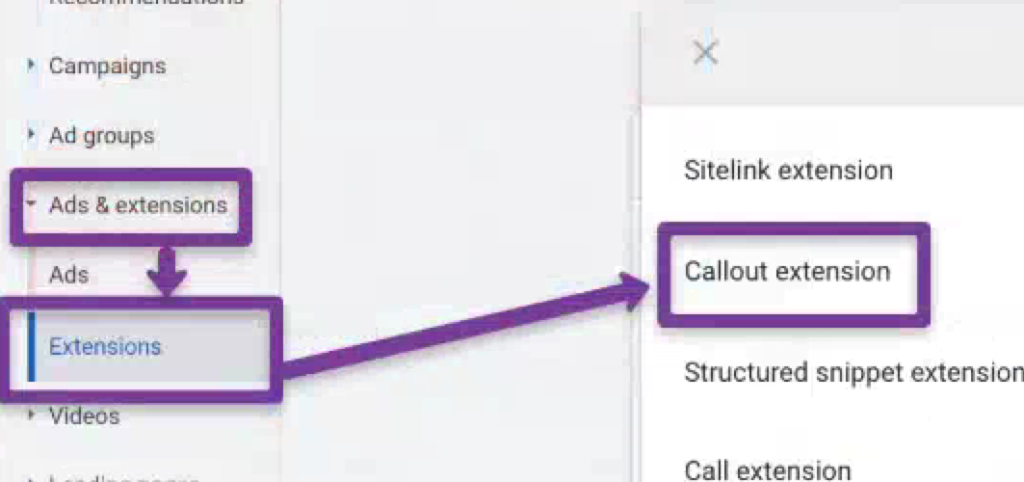
Callout assets are short, non-clickable text snippets that appear below your Google Search ads, highlighting key selling points — “Free Shipping,” “24/7 Support,” “No Contract Required,” “Price Match Guarantee.” They cost nothing to add, take two minutes to set up, and consistently improve click-through rates by giving searchers more reasons to click your ad over a competitor’s.
Google displays between two and ten callouts alongside your ad, depending on screen size, device, and available space. Each callout can be up to 25 characters (including spaces), though keeping them under 15 characters is the practical sweet spot — shorter callouts mean more can display at once. Google decides which callouts to show, when to show them, and in what combination based on predicted performance.
This guide covers how callouts work, how they differ from sitelinks and structured snippets, the three-level application strategy, dynamic callouts, scheduling, and the performance analysis process that turns good callouts into great ones.
How Callouts Differ from Sitelinks and Structured Snippets
These three asset types appear in similar positions below your ad, and most advertisers confuse them. Each serves a different purpose:
Callout assets sell the value. Non-clickable text highlighting USPs and benefits. “Free Returns,” “Same-Day Dispatch,” “5-Year Warranty.” They don’t link anywhere — they add persuasive information to your ad.
Sitelink assets navigate to pages. Clickable links to specific landing pages: “Shop Sale Items,” “View Pricing,” “Contact Us,” “Download App.” Each sitelink points to a distinct URL.
Structured snippet assets organize the offering. Non-clickable lists under predefined headers like “Types,” “Services,” “Brands,” or “Destinations.” Example: “Services: Installation, Repair, Maintenance, Inspection.”
Use all three together. Callouts highlight why to choose you. Sitelinks show where to go next. Structured snippets show what you offer. They complement each other and together create a more complete, compelling ad presence that takes up more space on the results page.
The Three-Level Application Strategy
Callouts can be applied at three levels in your Google Ads account. Each level serves a different strategic purpose.
Account Level
Apply callouts that are universally true across your entire business. These should appear with every ad in every campaign.
Examples: “Free Shipping Over $50,” “24/7 Customer Support,” “Established Since 1998,” “Hassle-Free Returns,” “BBB A+ Rated.”
Start here. Account-level callouts give you immediate coverage across all campaigns before you’ve set up more specific callouts at lower levels.
Campaign Level
Apply callouts specific to each campaign’s product category or service line. A campaign promoting winter jackets gets different callouts than a campaign promoting summer dresses.
Winter jacket campaign: “Waterproof Materials,” “Rated to -30°C,” “Free Size Exchange.” Summer dress campaign: “Breathable Fabrics,” “30+ Styles Available,” “New Arrivals Weekly.”
Ad Group Level
Apply callouts tailored to the specific product or service within an ad group. This is the most granular level and where callout messaging should be most specific.
Running shoes ad group: “Shock-Absorbing Sole,” “Lightweight Design,” “Wide Sizes Available.” Trail shoes ad group: “Grip Technology,” “Waterproof Upper,” “Reinforced Toe.”
The layering logic: Google combines callouts from all three levels. A searcher might see your account-level “Free Returns” alongside your ad-group-level “Waterproof Upper.” The more relevant callouts you provide at each level, the more combinations Google can test.
How Many Callouts Should You Create?
The original Google Ads documentation suggests a minimum of four. In practice, provide at least eight — ideally twelve to twenty. More callouts give Google more combinations to test. The system selects the best performers automatically, but it can only select from what you provide.
With only four callouts, Google has limited testing options. With fifteen, it can test dozens of combinations across different queries, devices, and competitor contexts to find what drives the highest engagement.
Don’t pad with weak filler to hit a number. Each callout should communicate a distinct, genuine benefit. “High Quality” and “Premium Quality” aren’t two callouts — they’re the same vague claim phrased twice.
Writing Callouts That Perform
Keep Them Under 15 Characters
The technical limit is 25 characters. The practical recommendation is under 15. Why? Google shows more callouts simultaneously when each one is shorter. Four callouts at 12 characters each take less space than two callouts at 24 characters — and four selling points are more persuasive than two.
“Free Shipping” (13 characters) outperforms “We Offer Free Shipping On All Orders” (which exceeds the limit anyway). Strip every word that doesn’t add information.
Be Specific, Not Vague
Quantified claims outperform generic ones:
- “5-Year Warranty” beats “Long Warranty”
- “4.9★ Rating” beats “Highly Rated”
- “Same-Day Dispatch” beats “Fast Shipping”
- “No Setup Fees” beats “Affordable”
- “Over 10,000 Sold” beats “Popular Product”
Specificity builds credibility. Vague callouts (“Best Quality,” “Great Service”) are invisible because every competitor claims the same thing.
Match Callouts to Search Intent
Different campaigns target different intents, and callouts should reinforce the specific concerns of each audience:
Transactional intent (ready to buy): “Price Match Guarantee,” “Free Returns,” “Buy Now, Pay Later,” “Same-Day Delivery.”
Commercial investigation (comparing options): “Compare Plans,” “Free Trial Available,” “No Long-Term Contract,” “Cancel Anytime.”
Local intent (searching nearby): “Walk-Ins Welcome,” “Free Parking,” “Open Weekends,” “Serving Since 2005.”
Don’t Duplicate Your Ad Copy
Callouts should add new information, not repeat what your headlines and descriptions already say. If your headline says “Free Shipping on All Orders,” don’t create a callout that says “Free Shipping.” Use that callout slot for a different benefit the searcher hasn’t seen yet.
Dynamic Callout Assets
Google now automatically generates callout text from your landing pages using AI. These dynamic callouts supplement your manually created ones and can surface selling points you might have missed.
Dynamic callouts are enabled by default in most accounts. You can view which dynamic callouts Google has created and how they’re performing in the Assets section of your Google Ads account — filter by “Source” to see which callouts are “Automatically created” versus manually added.
When dynamic callouts help: they fill gaps in your callout coverage and test messaging angles you hadn’t considered.
When to override them: when Google pulls generic or inaccurate text from your landing page. Review dynamic callout performance monthly. If an auto-generated callout has poor engagement or misrepresents your offering, pause it and replace with a manual alternative.
You can disable dynamic callouts at the campaign level if you need complete control over messaging.
Scheduling Callouts
Callout scheduling lets you show specific callouts only during certain days and times. This is particularly useful for time-sensitive messaging.
Practical applications:
- “Same-Day Delivery” only on weekdays when your fulfillment center operates
- “Open Now” only during actual business hours
- “Weekend Special: 15% Off” only on Saturday and Sunday
- “Order by 2pm for Next-Day Delivery” only before 2pm
Set schedules in the callout asset settings under “Advanced options.” This prevents showing promises you can’t fulfill (like same-day delivery at 11pm on a Sunday) and lets you rotate promotional callouts aligned with your marketing calendar.
Mobile vs. Desktop Display
Callouts display differently across devices, and this affects your strategy.
Desktop: Google can show up to ten callouts, displayed in a single line or wrapped across two lines. Longer callouts are more viable on desktop because screen space is generous.
Mobile: Fewer callouts display — typically two to four. Character constraints are tighter because of smaller screens. This is why the “under 15 characters” recommendation matters most on mobile — shorter callouts mean more can fit.
If your account is heavily mobile (check your device performance breakdown), prioritize the most impactful callouts in positions where Google is most likely to show them. Google’s algorithm generally selects the best performers automatically, but front-loading your strongest callouts helps.
Measuring Callout Performance
Where to Find the Data
In Google Ads, navigate to Assets > Associations. Filter by “Callout” to see performance data for each callout asset. Key columns: impressions, clicks (attributed to ads where the callout appeared, not clicks on the callout itself — callouts aren’t clickable), CTR, and conversions.
Google assigns performance labels: “Best,” “Good,” “Low,” or “Learning.” These labels compare each callout’s performance relative to your other callouts.
Optimization Workflow
Monthly review: Check performance labels. Replace “Low” rated callouts with new variations testing different messaging angles. Keep “Best” performers active.
Quarterly audit: Review all callouts across account, campaign, and ad group levels. Remove duplicates, update outdated messaging (expired promotions, changed policies), and add new callouts reflecting recent business improvements or competitive advantages.
A/B testing: Create two versions of the same benefit (“Free Returns” vs “30-Day Returns” vs “Easy Returns”) and run them simultaneously. After accumulating enough impressions (typically 1,000+ per callout), compare CTR and conversion impact. Keep the winner, replace the loser.
What Good Looks Like
There’s no universal CTR benchmark specifically for callout impact (since callouts aren’t independently clickable). The metric to watch is overall ad CTR and conversion rate for ads where callouts appeared versus those where they didn’t. If adding or changing callouts correlates with improved ad-level metrics, the callouts are doing their job.
Callout Examples by Industry
Ecommerce
Free Shipping, Easy Returns, Price Match, Buy Now Pay Later, Same-Day Dispatch, Over 50,000 Reviews, Secure Checkout, Gift Wrapping Available, New Arrivals Weekly, Loyalty Rewards
SaaS / B2B
No Credit Card Required, Free 14-Day Trial, Cancel Anytime, SOC 2 Certified, 99.9% Uptime, Dedicated Support, API Access, Custom Plans Available, Used by 5,000+ Teams, GDPR Compliant
Local Services
Licensed & Insured, Free Estimates, Same-Day Service, Locally Owned, Serving Since 2005, Emergency Service, Satisfaction Guarantee, Senior Discount Available, Open Weekends, BBB A+ Rated
Healthcare / Professional Services
Board Certified, Accepting New Patients, Telehealth Available, Most Insurance Accepted, Evening Hours, Multilingual Staff, Free Consultation, Confidential Service, 20+ Years Experience
Frequently Asked Questions
Do callout assets affect Quality Score?
Not directly. Quality Score is calculated based on expected CTR, ad relevance, and landing page experience at the keyword level. However, callouts improve your ad’s click-through rate, which indirectly improves expected CTR — a Quality Score component. Callouts also increase ad rank by contributing to the “expected impact of assets” factor in the auction, meaning your ad can achieve higher positions without raising your bid.
How many callouts should I add?
Minimum eight, ideally twelve to twenty across your account. Google needs variety to test combinations. Four callouts gives Google minimal testing options. Fifteen gives it dozens of combinations to optimize across different queries, devices, and competitive contexts.
What’s the ideal character length for a callout?
Under 15 characters is the practical recommendation, despite the 25-character limit. Shorter callouts allow more to display simultaneously, which means more selling points visible to the searcher. Every character beyond 15 reduces the number of callouts that can appear together.
Should I use dynamic callouts or create my own?
Both. Manual callouts give you control over messaging. Dynamic callouts fill gaps and test angles you might not have considered. Review dynamic callout performance monthly — keep the ones that perform well, pause the ones that misrepresent your offering or show poor engagement.
Can I schedule callouts to show at specific times?
Yes. Use the scheduling feature in callout asset settings to show time-sensitive callouts only when they’re accurate — “Same-Day Delivery” only during fulfillment hours, “Weekend Special” only on weekends. This prevents showing promises you can’t fulfill and lets you rotate promotional messaging automatically.
What’s the difference between callouts and structured snippets?
Callouts highlight benefits and USPs in freeform text (“Free Returns,” “24/7 Support”). Structured snippets list offerings under predefined category headers (“Types: Sedan, SUV, Truck” or “Services: Installation, Repair, Maintenance”). Callouts are persuasive — they tell users why to choose you. Structured snippets are informational — they tell users what you offer. Use both.



-150x150.png)


