
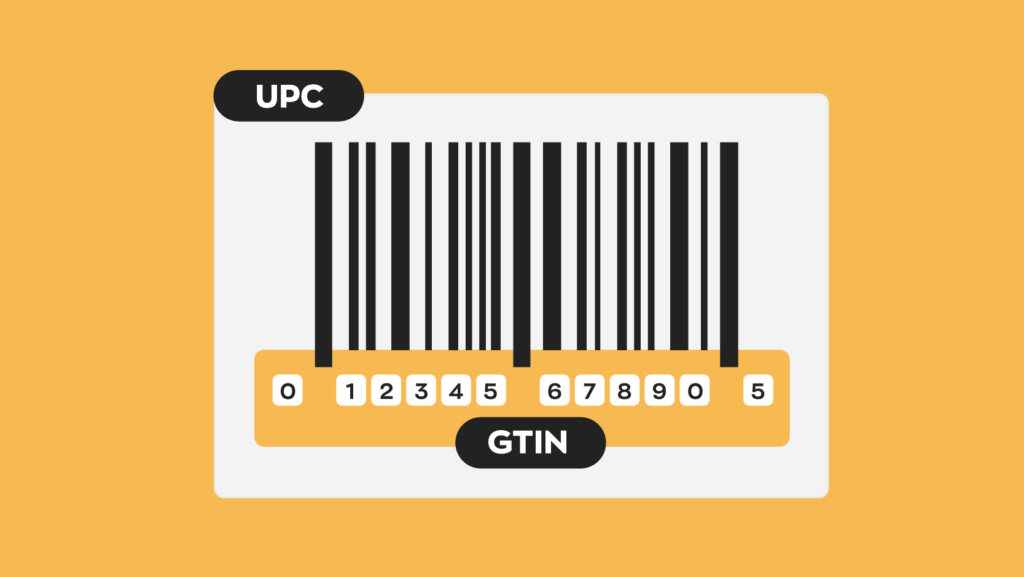
A Global Trade Item Number (GTIN) is a unique numeric identifier assigned to a product so it can be recognized, tracked, and traded across the global supply chain. It’s the number encoded in the barcode on product packaging — the one that gets scanned at checkout, logged in warehouse management systems, and submitted to platforms like Google Shopping and Amazon.
GTINs are managed by GS1, the international standards organization responsible for product identification. GS1 issues Company Prefixes to businesses, which are then used to create GTINs for individual products. No two products worldwide should share the same GTIN. That uniqueness is what makes the system work — it allows any database anywhere to identify exactly which product is being referenced, regardless of language, market, or platform.
If you sell physical products, GTINs are relevant to your operations. Google requires them for Shopping listings. Amazon requires them in 25+ product categories. Retailers worldwide rely on them for inventory management, order processing, and supply chain traceability. This guide covers how GTINs work, the different formats, how to get them, how they function on major ecommerce platforms, common mistakes, and the GS1 Digital Link transition that’s reshaping barcode standards in 2026-2027.
The Four GTIN Formats
GTINs come in four lengths. The format you use depends on your product type, market, and where the barcode will be scanned.
GTIN-8 (8 digits): The smallest format, used for products with very limited packaging space — think gum packets, single-use sachets, small cosmetics. Encoded in an EAN-8 barcode. Structure: 3-digit GS1 prefix + 4-digit item reference + 1 check digit. Primarily used outside North America. Must be specifically requested from your local GS1 office because the limited digit space means fewer available numbers.
GTIN-12 / UPC (12 digits): The standard format in the United States and Canada. This is the familiar UPC-A barcode on nearly every retail product in North America. Structure: 1-digit number system character + 5-digit manufacturer code + 5-digit item number + 1 check digit. UPC-E is a compressed 6-digit variant for smaller packages, though it encodes a full GTIN-12 internally.
GTIN-13 / EAN (13 digits): The international standard used in Europe and most countries outside North America. Originally called the European Article Number. Structure: GS1 prefix + manufacturer code + product reference + check digit (following a 1-6-6 pattern, though prefix and manufacturer code lengths vary). Any UPC-A code can be converted to its EAN-13 equivalent by adding a leading zero, which means GTIN-13 effectively covers all GTIN-12 codes. This is the global retail standard.
GTIN-14 (14 digits): Used for logistics packaging — cases, cartons, pallets — rather than individual retail items scanned at checkout. A GTIN-14 never starts with zero. Structure: 1-digit indicator (1-8, indicating packaging level) + GS1 Company Prefix + item reference + check digit. The indicator digit 9 denotes variable-measure trade items. Encoded in ITF-14 or GS1-128 barcodes depending on industry requirements.
Special cases: ISBN (International Standard Book Number) is a GTIN-13 with a 978 or 979 prefix. ISSN (International Standard Serial Number) identifies periodicals. ISMN (International Standard Music Number) identifies printed music. All integrate into the GS1 GTIN framework.
GTIN vs. SKU vs. MPN: Three Different Things
These three identifiers get confused constantly. Each serves a different purpose.
GTIN (Global Trade Item Number): A globally unique, standardized product identifier issued through GS1. The same GTIN identifies the same product everywhere in the world, regardless of which retailer sells it. Two different sellers of the same Nike shoe in size 10, blue, use the same GTIN.
SKU (Stock Keeping Unit): An internal product code created by the retailer or seller. SKUs are unique within one company’s inventory system but have no meaning outside it. Two different retailers selling the same product will use completely different SKUs. SKUs cannot replace GTINs on ecommerce platforms.
MPN (Manufacturer Part Number): A code assigned by the manufacturer to identify a specific product. MPNs are manufacturer-specific but not globally standardized like GTINs. Different manufacturers may coincidentally use the same MPN for different products. On Google Shopping, MPN is required when a product doesn’t have a manufacturer-assigned GTIN.
The hierarchy: GTIN is the universal identifier (one number, globally unique). MPN is manufacturer-specific. SKU is retailer-specific. For ecommerce platforms, GTIN is the strongest signal. If a product has a GTIN, provide it. If no GTIN exists, provide MPN + Brand. If neither exists (handmade, custom, vintage products), set identifier_exists to false.
How to Get GTINs for Your Products
Purchase directly from GS1. GS1 is the only organization authorized to issue authentic GTINs. Two options:
- Single GTIN: $30 per GTIN, no annual renewal fee. Suitable for businesses with a small number of products.
- GS1 Company Prefix: Starts at $250 for a prefix that supports 10 GTINs, with a $50 annual renewal fee. Scales up: $750 for 100 GTINs, $2,500 for 1,000 GTINs. The more GTINs you need, the lower the per-unit cost. The Company Prefix is the foundation — it’s a unique sequence assigned to your company, from which you create individual GTINs for each product.
After purchase, GS1 emails your GTINs or Company Prefix along with access to tools like GS1 Data Hub for creating barcode images.
Use manufacturer-provided GTINs. If you’re a retailer selling brand-name products, the GTIN already exists — it was assigned by the manufacturer. Find it on the product packaging (near the barcode), in manufacturer catalogs, on supplier invoices, or on the brand’s website. Always verify the number with the manufacturer to avoid duplicates or errors.
Apply for a GTIN exemption. Some platforms allow sales without GTINs for specific product types: private-label/handmade products, items you manufacture without barcodes, bundled products, generic unbranded items, and parts without Product IDs. Each marketplace requires a separate exemption request. Amazon typically processes within 48-72 hours; Walmart within 3 business days. Products from brands with existing GS1-approved barcodes cannot be exempted.
Do not buy GTINs from third-party reseller sites. This is a common shortcut that causes problems. Third-party sellers often resell prefixes that belong to other companies, which means the GTINs may not be unique. Google and Amazon cross-check GTIN validity against GS1 databases. Invalid or duplicated GTINs result in listing rejections, account warnings, or loss of selling privileges.
GTINs on Google Shopping: Why They’re a Ranking Signal
Google requires GTINs for all products that have a manufacturer-assigned identifier. This isn’t optional — if a GTIN exists for your product and you don’t provide it, your listing may be disapproved or lose significant impression share.
Here’s what happens when you provide a valid GTIN to Google:
Product matching and enrichment. Google uses the GTIN to match your product listing against its product knowledge graph — a massive database of products, specifications, and reviews from across the web. A valid GTIN lets Google automatically enrich your listing with aggregated reviews, seller ratings, detailed specifications, pricing comparisons from other sellers, and badges like “Best Seller” or “Popular Item.” You don’t create this content. Google pulls it from its knowledge graph because the GTIN tells it exactly which product you’re selling.
Search relevance and CTR. GTIN-matched product listings show approximately 40% higher click-through rates compared to listings without unique identifiers. Products with valid GTINs need less algorithmic adjustment to match search queries, which translates to lower advertising costs and better positioning in Shopping results.
De-duplication. Google uses GTINs to group identical products from different sellers. This enables price comparison shopping and “see all sellers” functionality. If your product has a GTIN and your competitor provides it but you don’t, your listing may not appear in these comparison views.
Validation and enforcement. Google cross-checks submitted GTINs against its product knowledge graph. Approximately 6% of submitted GTINs are invalid — malformed, wrong check digit, or assigned to a different product. Invalid GTINs result in disapproval. Setting identifier_exists to false on a product that Google knows has a GTIN (because other sellers have submitted it) also triggers rejection.
Google’s Content API shutdown: August 18, 2026. Programmatic merchants must migrate to the Merchant Center API. New product attributes launched April 14, 2026, and 500×500 minimum image enforcement begins January 31, 2027. These changes reinforce Google’s push toward complete, structured product data — with GTIN as a foundational element.
GTINs on Amazon and Other Marketplaces
Amazon requires GTINs (UPC, EAN, or ISBN) for product listings in 25+ categories. The GTIN must match the product exactly — same size, color, packaging configuration. Amazon validates GTINs against the GS1 database.
Brand Registry: Brands enrolled in Amazon Brand Registry get additional protections and listing control, but still need valid GTINs. Brand Registry doesn’t replace the GTIN requirement — it supplements it.
GTIN exemption on Amazon: Available for private-label products, products you manufacture without barcodes, parts without Product IDs, and bundled products. Request through Seller Central. Processing time: 48-72 hours. Products from brands with existing GS1-approved barcodes are not eligible.
Other platforms: eBay recommends GTINs for all listings and requires them for certain categories. Walmart requires GTINs for marketplace listings. Meta Commerce Manager requires brand, MPN, or GTIN for product listings. The trend across all major platforms is toward mandatory GTIN submission for branded products.
When You Need a New GTIN: The GTIN Management Standard
GS1’s GTIN Management Standard defines when an existing product requires a new GTIN. This is important because using the wrong GTIN — or failing to issue a new one when required — creates supply chain confusion and can cause marketplace listing errors.
You need a new GTIN when:
- The product’s net content or count changes (different size, different quantity in the package)
- The product formulation or composition changes significantly
- The packaging type changes in a way that affects the product (e.g., switching from glass bottle to plastic)
- The product brand changes
- The product is marketed as a different item (even if the physical product is identical)
- Regulatory requirements mandate a new identifier
You do NOT need a new GTIN when:
- The packaging artwork changes (new label design, updated graphics) without changing the product itself
- The price changes
- The product is sold through a different distribution channel
- A promotional temporary packaging is used (unless it’s a different product configuration)
Reuse rules: A previously assigned GTIN cannot be reused for a different product. Once a GTIN is retired, it should remain unused for at least 48 months to prevent confusion in supply chains and databases.
The GS1 Digital Link and the 2D Barcode Transition
The barcode landscape is undergoing its biggest change in 50 years. GS1 is transitioning from traditional 1D barcodes (the black-and-white lines you’re used to seeing) to 2D barcodes — specifically QR codes powered by GS1 Digital Link.
What’s changing: Traditional barcodes can only encode a GTIN (a number). A GS1 Digital Link QR code encodes a web URI that resolves to dynamic, context-aware information — product details, authenticity verification, batch/lot information, sustainability data, promotional content — all from a single scan. The same QR code on a product can show different information depending on who scans it: a consumer gets product details and reviews; a warehouse worker gets logistics data; a regulator gets compliance information.
Sunrise 2027: This is the industry target date by which retailers are expected to accept 2D barcodes (GS1 Digital Link QR codes) at point of sale, alongside or instead of traditional 1D barcodes. Major retailers including Walmart and Carrefour have already begun pilot programs.
What this means for businesses: If you’re assigning GTINs now, your GTIN will carry forward into the GS1 Digital Link era. The GTIN remains the core identifier — it’s embedded in the Digital Link URI. The change is in the data carrier (from 1D barcode to 2D QR code), not in the GTIN itself. Start planning for the transition now, but your existing GTINs remain valid.
GTIN Validation: How to Check Before You Submit
Before submitting GTINs to any platform, validate them.
Check digit verification. Every GTIN includes a check digit (the last digit) calculated from the preceding digits using a specific algorithm. An incorrect check digit means the GTIN is invalid. GS1’s free check digit calculator verifies this instantly.
Verified by GS1. GS1’s verification service confirms that a GTIN was legitimately issued by a GS1 Member Organization and is associated with the correct company. Use this to verify GTINs from suppliers or manufacturers.
Google GTIN validation. Google Merchant Center runs its own GTIN validation. If your GTIN doesn’t match Google’s product knowledge graph, the listing gets disapproved. Check your Merchant Center diagnostics regularly for GTIN-related warnings or errors.
Barcode quality. A valid GTIN is useless if the barcode encoding it can’t be scanned. Barcode quality should meet minimum ISO/IEC 15416 (1D) or ISO/IEC 15415 (2D) standards. Print quality, quiet zones (white space around the barcode), and size all affect scannability.
Common GTIN Mistakes and How to Avoid Them
Using internal SKUs instead of official GTINs. Marketplaces require GTINs, not internal codes. SKUs mean nothing outside your own inventory system. Submitting SKU numbers in the GTIN field results in rejection.
Buying from unauthorized third-party resellers. GTINs purchased from sites other than GS1 may be duplicated, reassigned, or invalid. Google and Amazon validate against GS1 databases. Non-GS1 GTINs are a ticking time bomb for listing rejections.
Incorrectly setting identifier_exists to false. If your product has a manufacturer-assigned GTIN and you tell Google it doesn’t, Google will catch the discrepancy. Its product knowledge graph already knows the product has a GTIN because other sellers submitted it. This triggers disapproval.
Using the same GTIN for different product variants. Each distinct product variation — different size, color, flavor, packaging — needs its own GTIN. A medium blue shirt and a large blue shirt are different products. They need different GTINs.
Not updating GTINs when products change. Per the GTIN Management Standard, significant product changes (size, formulation, packaging type) require a new GTIN. Continuing to use the old GTIN after a change creates database mismatches across the supply chain.
Submitting malformed GTINs. GTINs must pass check digit validation. Transposed digits, extra spaces, or dashes cause failures. Validate every GTIN before submission.
Neglecting GTIN on unbranded/private-label products. Even if you manufacture the product yourself, assigning a GTIN (by purchasing from GS1) improves your listing performance on Google Shopping and Amazon. GTIN exemptions are available, but products with GTINs consistently outperform exempt listings in search visibility.







