
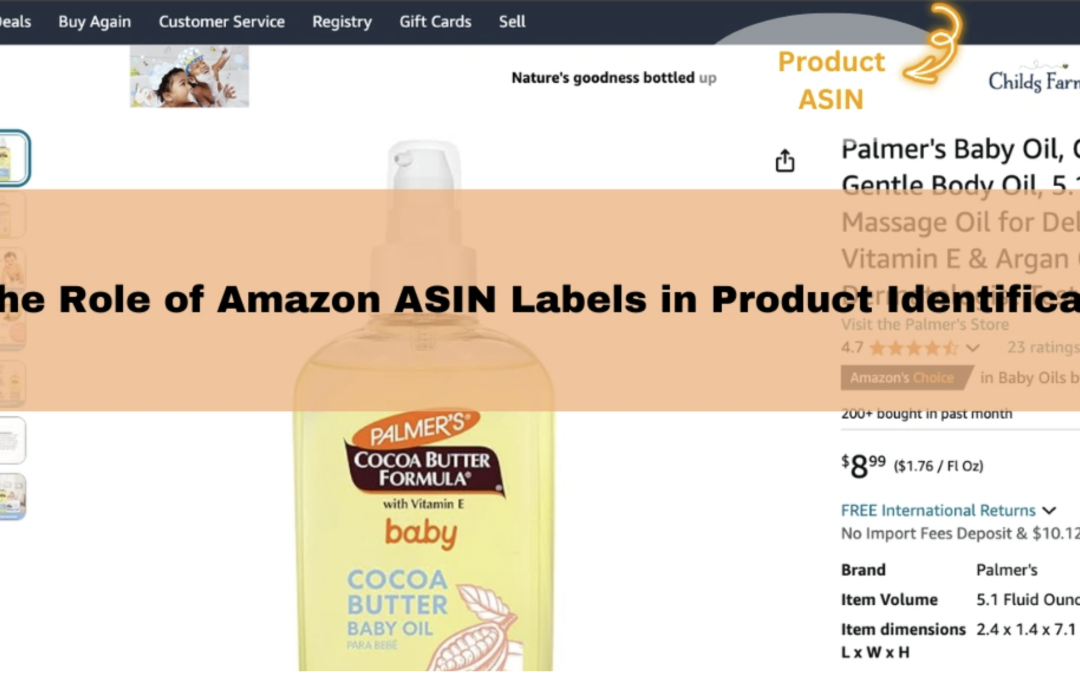
The Amazon marketplace is so big that you might have noticed something called ASIN while browsing through products. These unique product codes are the foundations of success for anyone selling or planning to sell on Amazon. The platform has grown bigger than Google as the primary destination for product searches, with more than 350 million products. Each item in this massive collection needs its own ASIN.
“Amazon Standard Identification Number” or ASIN is a unique 10-character alphanumeric code that Amazon assigns to every product in its store. You’ll notice these codes usually start with ‘B0’, while books begin with a number. Each marketplace has its own ASIN system, which means different national Amazon sites might use different ASINs for identical products. Amazon sellers should handle these codes carefully because incorrect usage could violate selling terms and lead to losing platform selling privileges.
This piece covers everything about ASINs – their meaning, location, creation requirements, and ways to manage them effectively. New sellers and experienced merchants who want to improve their Amazon business will find this knowledge valuable as the first step toward marketplace success.
What is an ASIN and what does it mean?
ASINs (Amazon Standard Identification Numbers) are the foundations of Amazon’s massive product catalog organization system. Rebecca Allen, an Amazon software engineer, created them in 1996 as the company grew beyond books and needed a better way to identify its growing product range.
Definition of ASIN
ASIN means Amazon Standard Identification Number – a unique 10-character code mixing letters and numbers that Amazon gives to every product in its marketplace. This identifier works like Amazon’s internal barcode system and helps the company track millions of products worldwide. ASINs work only in Amazon’s ecosystem, unlike universal product codes used by many retailers.
These identification numbers play vital roles in Amazon’s operations. They track products throughout the Amazon store and group similar offers on a single product page to make shopping easier. Sellers can also keep an eye on their stock levels and plan reorders better.
Amazon sellers need to know about ASINs because these codes link everything about their listings. From titles and prices to reviews and inventory – everything connects to a unique ID that Amazon’s systems can quickly find.
ASIN format and structure
ASINs use 10 letters and/or numbers in a specific pattern. Most product ASINs start with “B0” (non-book items), while books usually begin with a number. You might see ASINs like “B07FZ8S74R” or “0451524934”.
This mix of characters isn’t random at all. Amazon chose the 10-character format because their databases and software were already set up to handle 10-character ISBN fields for books. This meant they didn’t need big changes to work with the new format.
Each product variation gets its own ASIN. Different sizes, colors, or editions of the same product need unique identifiers. ASINs also appear in the URLs of Amazon’s product pages, which makes direct linking to specific products possible.
ASIN vs ISBN, UPC, and EAN
ASINs rule Amazon’s world, but other product identification systems exist in retail:
ASIN and ISBN relationship: Books with 10-digit ISBNs share the same number as their ASIN. Kindle editions need their own ASINs instead of using print edition ISBNs. Books published after January 2007 use 13-digit ISBNs, but Amazon still gives them 10-character ASINs.
UPC (Universal Product Code): America’s standard retail product identifier uses 12 digits. Stores use UPCs to track sales, and these codes contain details about product features like weight, type, and name. UPC codes often help create new ASINs on Amazon.
EAN (European Article Number): This 12 or 13-digit code is Europe’s version of the UPC. EANs are just like UPCs except for their first digit, which shows the country code. Many global sellers need EANs from manufacturers to list on Amazon.
GTIN (Global Trade Item Number): This term covers UPCs, EANs, and other global identifiers. Amazon often asks for GTINs to create new ASINs.
ASINs work only on Amazon, unlike these universal identifiers. Books are the only products with guaranteed universal ASINs. Other items might have different ASINs in different Amazon marketplaces around the world.
Sellers who understand these differences can better handle Amazon’s product identification rules and make sure their products show up where buyers can find them.
Why ASINs are important for Amazon and sellers
ASINs are the foundations of Amazon’s marketplace ecosystem. Amazon offers more than 350 million products, and these unique identifiers make the platform’s massive catalog work smoothly for both the company and its sellers.
Catalog organization and product tracking
ASINs are the building blocks of Amazon’s product reference catalog data structure. These codes work like digital fingerprints that help identify every product quickly across Amazon’s big network of warehouses and digital systems.
Amazon uses ASINs to catalog millions of products seamlessly. These unique codes help track inventory, monitor sales metrics, analyze marketplace data, and let customers find their favorite items easily. Managing such a huge product catalog would be impossible without ASINs.
ASINs help sync shipments between Fulfillment by Amazon (FBA) warehouses in the logistics chain. When a customer places an order, Amazon uses the ASIN to find the exact product in its fulfillment centers and ships it efficiently. It also helps Amazon spot fake products from genuine ones, which builds brand trust and keeps the catalog reliable.
Search and SEO relevance
ASINs substantially affect how easily customers can find products on the platform. Amazon ranks each product detail page by its ASIN. Unlike Google’s system where brands can build authority, Amazon makes proper ASIN management vital for visibility.
Sellers can improve their search rankings by optimizing ASIN listings. The key to ranking well is making sure your product shows up for relevant keywords. Your ASIN’s title, bullet points, and product descriptions should include strategic keywords that help customers find what they’re looking for.
Amazon’s search and recommendation algorithms need precise product identification through ASINs to show relevant search results and personalized recommendations. Better ASIN optimization can boost your product’s visibility and increase sales.
Inventory and listing management
ASINs make many parts of running an Amazon business easier for sellers. They help with accurate pricing, inventory updates, and tracking. Sellers can organize their e-commerce store better. They can also monitor how well products sell across different marketplaces.
ASINs connect to important inventory information including:
- Warehouse location and incoming shipments
- Pick-and-pack status and order routing
- Customer reviews and ratings for each listed item
- Sales performance metrics and inventory health
Good ASIN management helps avoid common seller issues. Amazon prohibits creating duplicate ASINs for products already in their catalog – doing so can get your ASIN creation or selling privileges suspended. Matching your products to existing ASINs when possible creates a better customer experience.
Selling experts say managing ASINs well isn’t just another task – it’s what makes an Amazon business profitable. Without a good system to handle ASINs, sellers often face stock problems, wrong listings, and inventory mix-ups that hurt their performance.
ASINs work as a common language between Amazon, sellers, and customers. Becoming skilled at using them brings better visibility, more sales, and better inventory control. They’re essential for success on Amazon.
How to find an ASIN on Amazon
Finding an ASIN becomes easy once you know the right spots to look. You can discover these unique identifiers in seconds with the right method, whether you’re checking out competition or managing your product listings. Here are four reliable ways to find any Amazon product’s ASIN.
Using the product URL
The quickest way to spot an ASIN is right in the product’s web address. Look for the code that comes after “/dp/” in any Amazon product URL. To name just one example, in www.amazon.com/dp/B08N5WRWNW, “B08N5WRWNW” is the product’s ASIN.
This works on every Amazon marketplace worldwide. Better yet, you won’t need to log in or get special access – just grab the code between “/dp/” and any question marks in the address bar. This comes in handy when you’re browsing competitor products and need ASINs quickly.
Checking the product details section
The product information area offers another simple way to find ASINs. Every Amazon product page has a “Product Details” or “Product Information” section at the bottom, whatever device you’re using.
This section lists product specs like dimensions, weight, and the ASIN. You’ll find it among other codes such as UPC, EAN, or ISBN where they apply. Just look for the “ASIN” label, and you’ll see the code right next to it.
This method works best when you’re already on a product page and need to double-check its unique identifier without messing with the URL.
Using Amazon Seller Central
Amazon sellers will find Seller Central the most complete way to handle ASINs. Log into your seller account, head to “Inventory,” and pick “Manage Inventory” from the dropdown.
The inventory management page shows all your listed products in a table. Each product’s ASIN stands out – usually under the product name or in its own column based on your settings. This dashboard lets you see all your ASINs at once without jumping between product pages.
Seller Central also helps track parent ASINs and their connections to child ASINs for products with different options like colors or sizes. Sellers with lots of SKUs will find this organized view makes inventory management much easier.
Third-party ASIN lookup tools
Dedicated ASIN lookup tools are a great way to get time back when you’re handling big catalogs or doing extensive competitor research. These tools help you search, verify, and export ASINs in bulk instead of one at a time.
These tools go beyond basic ASIN lookups by offering:
- Batch processing of multiple ASINs simultaneously
- Exporting ASIN data to spreadsheets
- Identifying related or complementary products
- Revealing sales rank and other performance metrics
Tools like AMZScout and Jungle Scout offer advanced features such as reverse ASIN lookup – showing which keywords bring traffic to specific ASINs. This helps you understand your competition’s strategy and make your listings better.
New sellers often love these tools for market research before creating listings since they show much more than just identification codes.
These four methods help you find any product’s ASIN in Amazon’s huge marketplace. Each one shines in different situations – from quick checks to complete seller management.
When and how to create a new ASIN
Choosing between an existing ASIN or creating a new one is a vital step in your Amazon seller experience. Your selling privileges could be affected by making the wrong choice, so knowing the difference matters for marketplace success.
When to use an existing ASIN
Your product needs to match an existing ASIN if it’s similar to one in Amazon’s catalog. This rule applies to items sharing the same brand, model, size, color, and exact specifications. The catalog stays clean and shoppers don’t get confused when sellers match existing ASINs.
Search using the product’s UPC, EAN, or ISBN in Seller Central’s “Add Products” tool before creating a new listing. You must match that existing ASIN if your search shows results. This becomes even more critical for retail or branded items other sellers already list on Amazon.
Amazon’s policies don’t allow duplicate ASINs for products in the catalog. Breaking this rule leads to serious problems – your listing might get suppressed, you could lose the Buy Box, or Amazon might suspend your selling privileges.
When to create a new ASIN
A new ASIN makes sense only when your product doesn’t exist in Amazon’s catalog. This typically fits:
- Private label products under your own brand
- Unique product bundles or multipacks with specific combinations
- Entirely new-to-market products
- Handmade or custom items that differ from existing listings
You’ll need several key details: a valid GTIN (unless exempt), product title, brand name, detailed description, bullet points, high-resolution images, pricing, and fulfillment method.
The process starts in Seller Central’s “Add a Product” section under Inventory. Select “I’m adding a product not sold on Amazon”. Amazon reviews your submission after you complete all required tabs and approves a new ASIN if everything checks out.
Using GTINs: UPC, EAN, ISBN
Amazon needs a Global Trade Item Number (GTIN) to generate a new ASIN. These global identifiers include:
- UPC (Universal Product Code): 12 digits, commonly used in the United States
- EAN (European Article Number): 13 digits, more common outside the US
- ISBN (International Standard Book Number): 10 or 13 digits, specific to books
Your product’s GTIN goes into the new listing process. Amazon checks if the product exists in its catalog and creates a new ASIN if needed.
Products without standard identifiers, like handmade goods, might qualify for a GTIN exemption through Seller Central. Your UPC or EAN must come from GS1, the official global standards organization. Amazon often rejects codes from resellers.
ASIN creation limits for new sellers
New sellers face limits on ASIN creation until they build a sales history. These limits reset every Sunday at 00:00 GMT.
List products that will sell quickly to expand your creation capacity gradually. Amazon might pause your ability to create new listings if you’ve made many ASINs without generating sales.
New ASIN approval times depend on your selling history and product category. Following Amazon’s guidelines helps avoid penalties and builds a strong marketplace presence.
Best practices for managing your ASINs
ASIN management is the life-blood of a successful Amazon business. Your products need proper ASIN management strategies after listing to maintain catalog integrity, improve performance, and boost overall sales potential.
Keep a record of your ASINs
A complete spreadsheet of all your ASINs will simplify inventory management. This hosted approach creates a centralized database where you can:
- Track performance metrics for each product
- Document any changes or issues that arise
- Group similar products by relevant categories
- Maintain accurate product information
Your ASINs should be organized by logical categories to view inventory quickly and make business decisions faster. This system becomes more valuable as your product catalog grows.
Monitor product performance
Your business growth depends on regular ASIN performance monitoring. Amazon’s ASIN Performance Alerts in Business Reports notify you about most important changes in your products’ metrics. Early users responded to fluctuations and took corrective actions within just 3 days on average—their reaction time was cut almost in half compared to manual monitoring.
These automated alerts can track:
- Sales performance changes
- Page view fluctuations
- Featured Offer percentage changes
Product Tracker tools offer complete solutions to monitor product performance over time and provide valuable metrics like average daily sales, price changes, and Best Seller Rank data. These monitoring systems help you make informed decisions based on accurate, real-time information.
Avoid duplicate listings
Amazon strictly prohibits creating duplicate ASINs for existing catalog products. This violation can result in temporary suspension or permanent removal of selling privileges. Customers find it difficult to search and make purchasing decisions with duplicate ASINs and split variations.
You should check your inventory regularly for potential duplicates. Amazon’s dedicated “Potential duplicates” page in Seller Central lets you review possible matches. You have 30 days to respond before an ASIN gets suppressed from search results after appearing on this page.
Use A+ content for brand enhancement
Brand-registered sellers can use A+ Content to improve their ASIN listings with compelling visuals and detailed information. This feature adds videos, enhanced images, comparison charts, and more to product detail pages.
Basic A+ Content can increase sales by up to 8%, while well-executed Premium A+ Content can boost sales by up to 20%. This enhanced content helps your brand’s story come alive by:
- Building brand awareness with engaging visuals
- Helping customers make informed purchasing decisions
- Creating dedicated Brand Stories that connect with shoppers
These ASIN management best practices will help maintain listing quality, prevent policy violations, and ended up driving better marketplace performance as your Amazon business grows.
Using reverse ASIN lookup for keyword research
Smart Amazon sellers go beyond simple ASIN management and tap into a powerful technique called reverse ASIN lookup to get ahead of competition. This strategy lets you look behind the scenes of winning product listings.
What is reverse ASIN lookup?
Reverse ASIN lookup helps you find which keywords bring traffic to specific Amazon product listings. The technique works differently from regular keyword research. You start with a competitor’s ASIN to see which search terms drive their sales. This approach helps you spot profitable keywords that already work well for similar products in your niche.
Tools for reverse ASIN lookup
You’ll need specialized tools to do reverse ASIN research:
- Helium 10’s Cerebro: Looks at up to 10 ASINs together and shows common keywords and unique chances
- Jungle Scout’s Keyword Scout: Creates keywords from competitor ASINs for your Amazon PPC campaigns
- MerchantWords ASIN+: Shows search volume data and estimates revenue for each keyword found
- AMZScout: Reveals competitor rankings for each keyword and their page position
Yes, these tools need subscriptions, but serious sellers see them as vital investments.
How it helps with SEO and ads
Reverse ASIN lookup makes your listing better by showing you keywords that actually sell products. This information helps you:
- Build better PPC campaigns that target keywords buyers use
- Make product listings better with terms customers search for
- Put your ad money where it counts – on keywords that convert
- Spot gaps in competitor strategies by looking at organic rank and search volume
Finding competitor keywords
Here’s how to research competitor keywords effectively:
- Pick successful competing products similar to yours
- Get their ASINs using methods we covered before
- Put these ASINs into your chosen reverse lookup tool
- Look through the keyword list for relevant terms with high volume
This method shows you exactly which terms put competitor products on Amazon’s first few pages. You’ll learn what works without guessing.
Conclusion
A deep grasp of ASINs can make or break your success as an Amazon seller. These unique 10-character codes are the DNA of every product listing and form the foundation of Amazon’s big catalog system. You might find it hard to direct yourself through Amazon’s marketplace or risk breaking policies without proper ASIN knowledge.
This piece has taught you about ASINs, their differences from other product identifiers, and their importance to Amazon and sellers alike. You now know how to find existing ASINs, when to create new ones, and ways to manage them for the best results.
Note that ASINs affect your product’s visibility, search ranking, and overall performance on the platform. Your selling operations will improve by a lot when you apply the best practices we covered – from keeping good records to tracking performance metrics.
Smart sellers make use of reverse ASIN lookup to learn about their competition and find profitable keywords. This advanced approach needs special tools but can really boost your listing optimization and advertising strategy.
ASINs may look like basic product codes at first. But they are the life-blood of Amazon’s entire marketplace ecosystem. Becoming skilled at using them helps you dodge common mistakes while boosting your products’ visibility and sales potential. Your long-term success on the marketplace depends on proper ASIN management, whether you’re new or growing your Amazon business.
FAQs
Q1. What exactly is an ASIN on Amazon? An ASIN (Amazon Standard Identification Number) is a unique 10-character alphanumeric code assigned by Amazon to every product in its marketplace. It serves as Amazon’s internal barcode system for tracking and organizing millions of products.
Q2. How can I locate the ASIN for a product on Amazon? You can find an ASIN in several ways: 1) Look in the product URL after “/dp/”, 2) Check the product details section on the listing page, 3) Use Amazon Seller Central if you’re a seller, or 4) Utilize third-party ASIN lookup tools for bulk searches.
Q3. When should I create a new ASIN versus using an existing one? Create a new ASIN only when your product truly doesn’t exist in Amazon’s catalog, such as for private label products or unique bundles. Use an existing ASIN when your product is identical to one already listed, including brand, model, size, and color.
Q4. Why are ASINs important for Amazon sellers? ASINs are crucial for catalog organization, product tracking, search visibility, and inventory management. They impact your product’s discoverability, sales performance, and overall success on the platform.
Q5. What is reverse ASIN lookup and how can it benefit sellers? Reverse ASIN lookup is a technique that allows you to discover which keywords drive traffic to specific product listings. It helps in competitive research, keyword optimization, and creating more effective PPC campaigns by revealing high-performing keywords with proven sales potential.



-150x150.png)


